|
Backup copy |
Scroll |
Backup ensures that your documents are kept as safe as possible. Therefore, it is recommended to always use at least one of the file backup options.
Backup is configured in the Backup copy section of the setting dialog box.
To access the section, invoke the Settings — Parameters...  command and in the dialog box that appears, select System — Files — Backup copy.
Backup settings section controls
Element |
Setting description |
|
Keep the original copy |
If this option is enabled, the system saves an initial copy of the document in the specified catalog. The copy is saved before executing the very first command to write the document to disk during a session. Saving is performed by copying the full file access path. For example, if you are working with a drawing that has been saved to c:\Work\First.cdw, and d:\Original is specified as the folder to save the source files, the copy of the source file will be written as d:\Original\c\Work\First.cdw. |
|
Catalog... |
A drop-down list that can be used to change the folder for saving the source files. The Catalog... option allows to a folder to save the option allows the user to select a folder for saving the previous copy of the document. After specifying the folder, the full path to the folder is displayed in the field. The list is available if the option Keep original copy is enabled. |
|
Keep previous copy |
If this option is enabled and a folder for saving is specified, the system saves the previous copy of the document state. A copy is saved each time the command to write a document to disk is executed during a session. The saving is done by copying the full path of the file. For example, if we are working with the drawing c:\Work\First.cdw, and the folder e:\Backup is specified as the folder for saving previous copies, the previous copy will be written as e:\Backup\c\Work\First.cdw .If the option is enabled, but the folder name is not specified, the previous copy is written to the same folder where the document itself is located. In this case, the name of the copy file is formed according to the following pattern: <document file name> + <.> + <name extension> + <.> + <bak> (for example, example.frw.bak). Restoring documents from *.bak files is described in the section Restoring documents from backup copy files. |
|
Catalog... |
A drop-down list that allows you to specify a folder to save the previous copy of the document. The following options are available. •Catalog... allows the user to select a folder to save the previous copy of the document After specifying the folder, the full path to it is displayed in the field. •In the same catalog with the document — the previous copy of the document will be written to the same folder and with the same name as the document itself, but with the *.bak extension . The list is available if the Keep previous copy option is enabled. |
|
Keep a «mirror» copy |
«Mirroring» is an optional data backup feature that creates an additional, duplicate copy of a document at a different location on the same disk or on a different physical disk (e.g., on a remote server disk with higher reliability). If enabled, the system will save a «mirrored» copy of the document in the specified folder each time a write-to-disk command is executed during a session. The saving is done by copying the full file access path. For example, if we are working with a drawing c:\Work\First.cdw and the folder to save previous copies is g:\Mirror, the «mirror» copy will be written as g:\Mirror\c\Work\First.cdw. |
|
Catalog... |
The option Catalog... allows the user to select a folder for saving a «mirror» copy of the document. After specifying the required folder, the full path to it is displayed in the field.The list is available if the Save «mirror» copy option is enabled. |
When the backup settings are complete, click Apply and close. To exit the dialog without saving changes, click Cancel.
In the folders specified for placing backups, when saving files, a folder structure is created that corresponds to the location on disk of the main document file. The name of the top folder in the created structure corresponds to the name of the disk on which the main file is saved. For example, drawing First.cdw is saved in the C:\Work\ folder, and D:\Reserve is specified as the folder to save the copy. The full path to the document copy file is D:\Reserve\C\Work\First.cdw.
To save different types of backup copies, it is not recommended that you specify the same folders, as you may lose information. If you try to complete the backup setup with such settings, a warning message will appear on the screen.
|
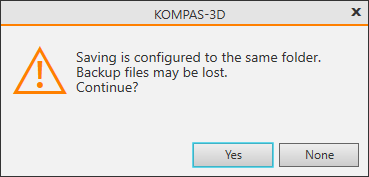
The buttons in this message allow you to confirm or reject the setup. If you decline, you can change the folders to be backed up. If the setting is confirmed, the backup will be performed. Only one file similar to the current state of the saved master file is created.
