|
Selecting curves when constructing a conical surface |
Scroll |
When creating a surface with a conical cross-section, the model’s existing linear objects are used, for example, to define guides or a line that determines the position of the cross-section.
When you select a curve (sketch line) or edge in the graphics area, you can choose a single object or a group of objects that meet a specific condition. To specify a condition, use the elements in the Quick Access Toolbar.
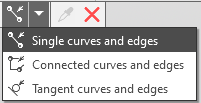
Selecting Curves and Edges Based on Conditions
If the specified objects intersect with or touch other objects (curves, edges, sketch lines), you can select these objects in their entirety or in parts, divided by the points of intersection or contact. This depends on the state of the Select Curve Segments  button on the Quick Access Toolbar. Read more...
Features of object selection:
•Edges, sketch lines, and segments of multi-segment curves are selected in the model’s graphics area. A single-segment curve can be specified either in the Design Tree or in the graphics area.
•To select a multi-segment curve in its entirety, you must specify it in the Design Tree or select all segments in the graphics area.
•If a curve has child curve objects, you can select either the entire curve or the objects it contains. Learn more...
|
When defining guides, you can select not only lines in the sketch but also the sketch itself in the Construction Tree. •If the sketch contains a single chain of objects, it is selected in its entirety. •If the sketch contains several separate objects or chains of objects, two of them are selected as guides, i.e., the fields for both guides are filled in. In this case, it is possible to use other objects to extend the chains that make up the guides. |

