|
SVG Export Settings Dialog (drawing, fragment) |
Scroll |
This dialog box appears on the screen if you selected the SVG format when saving a drawing or a section.
In the dialog box, you can configure the settings for saving to a file in the selected format.

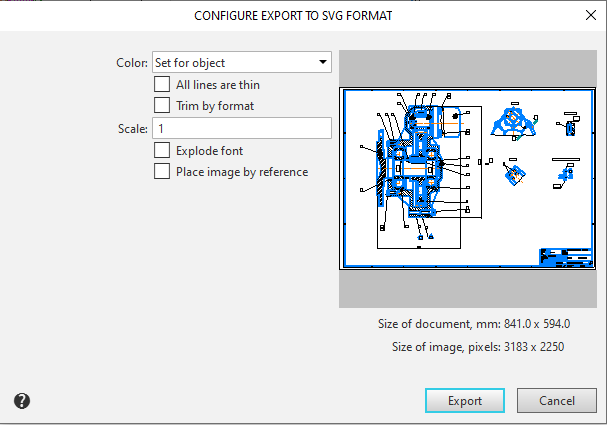
Description of Controls
Element |
Description |
|
Color |
A list from which you can select an image color. Learn more about the available options... |
|
All the lines are thin |
An option that allows you to draw all lines with the thickness set for printing thin lines in the system line settings. By default, this value (line thickness on paper) is 0.18 mm. If this option is disabled, lines are drawn with individual thicknesses for printing. Line thickness on paper is a line style parameter. For system styles, it is set in the system line settings dialog, and for user styles, it is set during their configuration. The line style also contains a "screen thickness" parameter. Its value does not affect the export result. The status of the All lines are thin option does not affect the thickness of font lines. |
|
Trim by format |
Enabling this option means that each page of the SVG file will be limited to the format size specified in the KOMPAS document. Only those parts of the image that are within the format will be saved to the created file. When this option is disabled, the page size is determined by the bounding rectangle of the objects. |
|
Scale |
Field for entering the image scale. |
|
Explode font |
An option that allows you to choose the format of the text to be rendered. •When this option is disabled, text is exported as text, i.e., as font characters. This allows the text to be copied from the SVG file later, for example. •When this option is enabled, the SVG file contains not the font characters themselves, but their representation as vector outlines. This method does not allow you to work with the text as text in the future. |
|
Place image by reference |
An option that allows you to choose how raster images are rendered. •If the option is disabled, descriptions of raster images in SVG syntax are generated in the resulting file. •If the option is enabled, the following occurs. PNG files containing the images inserted into the original KOMPAS document are created in the folder where the SVG file is saved. The names of the PNG files are generated from the SVG file name and a sequential number. Links to the created PNG files are generated in the SVG file. When transferring the SVG file to another workstation, the PNG files must also be transferred. |
|
Preview Window |
This window displays the page selected for recording. |
Once you have finished configuring the settings, click the Export to start recording. To cancel recording, click the Cancel.
|
Exporting to SVG format is subject to the print output filter settings. In other words, the resulting file will contain only those objects from the KOMPAS document that are set to print in the system configuration. |

