|
Path |
Scroll |
When constructing a tubular element, the following can be used as the path of the circle:
•a 3D curve, a segment of a multi-segment curve,
•a sketch line,
•an edge,
•a chain of the above objects in any combination (objects are specified in the order in which they are connected).
Objects are specified in the graphics area or in the Design Tree.
By selecting a curve (sketch line) or edge in the graphics area, you can select a single object or a group of objects that meet a specific condition. To specify the condition, use the elements in the Quick Access Toolbar.
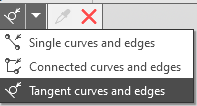
Selecting curves and edges based on conditions
If the specified objects intersect with or touch other objects (curves, edges, sketch lines), you can select them in their entirety or as the segments into which they are divided by the points of intersection or contact. This depends on the state of the Select parts of curves  button on the Quick Access Toolbar. Read more...
The name of the selected object(s) is displayed in the field Path on Parameter panel..
Below the field Path there is an option Select tangent objects. This option is used to automatically select smoothly joined objects that make up a chain:
•if the option is enabled, then after specifying one of the objects, the remaining curves of the chain are automatically determined,
•If the option is disabled, all objects that make up the chain are specified one by one.
If you need to use a broken line as a path (or its section) that is not in the model, you can build it without interrupting the work of the team. Press the button Broken line  to the right from the field Path. Process of broken line creation will be lunched. Perform the necessary actions to build a broken line (if the broken line being created is a section of a path, it must be adjacent to another object or objects included in the path). Complete the process of creating a broken line. The system will return to the initial operation. The resulting broken line will be automatically added to the objects that make up the path, its name will appear in the field Path.
The path can be closed or open.
