|
Methods for Placing Points on Curve |
Scroll |
You can select a method for placing points on the curve using the Method group of buttons. The following options are available:
The number of points is set in the field The number of points  .
.
The start and end points of the group coincide with the borders of the Work Portion of the curve. The other points are placed between them with an equal pitch by the curve.

The distance between points is set in the field Step.
The starting point of the group is aligned with the initial border of the curve’s work portion; other points are placed after it with the specified pitch along the curve.
•The Step toggle switch is located below the Step field. If the toggle switch is set to position I (enabled), a group of points will be built within the work portion of the curve and the number of points will be equal to the result of integer division of the curve length by the specified step plus one point. This result is displayed in the Number of Points field. The field itself is not available for manual input.
•If the toggle switch is set to position 0 (disabled), the field Number of Points is available for manual entry. The specified number of points with the selected pitch is plotted from the start point of the work portion.
|
The product of the pitch and a number of points minus 1 shall not exceed the curve length. |

 Uniform Step by Parameter of the curve
Curve parameter is an auxiliary variable (t) used to show dependence between the coordinates in parametric representation of the curve.
The number of points is set in the Number of Points field.
A point group is plotted in the following way:
1.The start and end points of the group coincide with the borders of the work segment of the curve.
2.The other points are located between the start and end points so that the difference between the values of the t parameter corresponding to adjacent points is the same, i. e. the parameter should change with an equal pitch from one point to another. The pitch is defined in the following way:
(tmax – tmin)/(n–1), where
tmax and tmin — values of the parameter t corresponding to the start and end points of the group, i.e. the borders of the parametric area segment corresponding to the work segment of the curve;
n is the specified number of points.
If the curve is multi-segment, keep in mind that every segment of the curve has its own parametric region. Parametric regions of segments are equal and together make a cumulative region. A group of points is plotted within this region, i. e. the values of the parameter tmax, tmin, and a pitch of parameter change are obtained.
The Figure shows plotting of seven points with an equal pitch by parameter on a two-segment broken line. First, a pitch of parameter change is defined: there are 5 points in the cumulative parametric region of segments which divide the region into 6 equal parts, and the parameter values at these points. Then, the points corresponding to each of the five values of the parameter are created on the broken line.
|
|
a) |
b) |
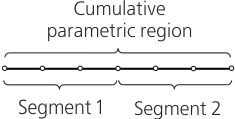
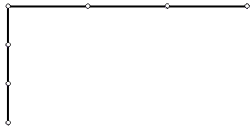
Example of plotting a group of 7 points on a broken line
a) defining a pitch of parameter change, b) setting points on a broken line
