|
Group BOM – option A |
Scroll |
If the current BOM has the style Group BOM (variant A)..., then its table does not differ from the table of a simple BOM (with the style Simple BOM GOST R 2.106–2019).
When creating a new type A group BOM, the cell of the Quantity column is displayed vertically divided into several parts (rows). Their number is equal to the number of versions of the specified product defined in the BOM configuration. In the first line, quantities are entered for version zero (basic), in the second line quantities are entered for version one, and so on.
•Items having the same quantity for all versions of the product (that is, all rows of the Quantity cell contain the same value) are considered as part of the constant data. These items are automatically placed at the beginning of the BOM in the relevant sections (see Fig.).
•Items having the different quantity for all versions of the product (that is, at least one row of the Quantity cell contains a value different from the rest), are considered to be part of the variable data. After confirming the creation of an item, the lines containing the quantity data will be split.
The procedure for generating variable data is as follows.
1.In the BOM, the Variable data for versions header is created. According to the standard, it is located after the fixed data. Below this header, blocks are formed, i.e. groups of variable data related to the same product version. The beginning of the block is a string containing the designation of version. The beginning of the blocks are formed automatically using the designation specified in the title block of the BOM.
2.The lines corresponding to the item, the quantities of which are different for different versions, appear in the versions (blocks). These lines differ only in the values in the Quantity column. In versions with no quantity specified when creating the item (that is, the Quantity cell line was left empty), this item does not occur.
If the version does not contain variable data (i.e. for it, the the Quantity cell row was left empty in all items), then the block of this version consists of one row with the word None. If there are no variable data in any version, then blocks for them are not created, and a line with the text Differences in versions by assembly drawing is added to the end of the BOM. The specified lines are labels of absence of variable data.
The text of the labels is editable. The modified text is saved in the document.
If variable data are added to the versions, this label will be deleted automatically.
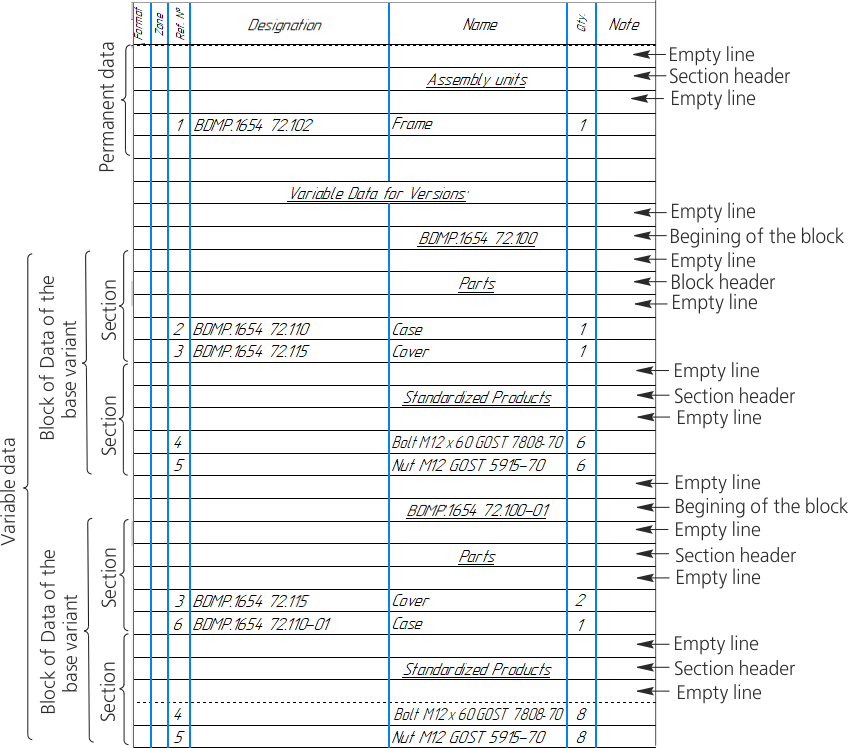
Constant and variable data in type A group BOM
When versions setting in the BOM The following parameters can be changed:
•Enable the option Place block on new sheet — each block will begin at the top of a new page.
•Disable the option Show versions without variable data — versions without variable data will be ignored: no blocks will be created for them and no marks about the absence of variable data will be generated.
•Set the switch Show block titles to 0 (disabled) — the beginning of the version blocks will not be displayed in the BOM sheet. Blocks for versions without variable data in this case are not created regardless of the state of the option Show versions not containing variable data.
Notes on filling the Documentation section in type A group BOM
In the Documentation section of type A group BOM the Quantity field is not filled in.
Therefore, when creating items of this section in the type A group BOM, you should put a label in the lines of versions that contain no document. A label can be any symbol (after the object is created it will be replaced with the letter x).
As a result, the designation and name of the document will appear in those versions for which the line is left empty (while for the items of the remaining sections this will be the sign meaning that the version does not contain the item). If all lines of the Quantity cell are empty, then the document will be considered as fixed data for the versions.

