|
Document designation |
Scroll |
Document designation may be simple or compound. A name is regarded simple if it comprises only the base designation. A compound designation, along with the basic part, includes the design version number and/or complementary version number, and/or the document code.
A simple designation may be entered or edited directly in the cell of the title block, whereas work with the compound designation is performed in a special dialog where a dedicated field if provided for each part of the designation.
|
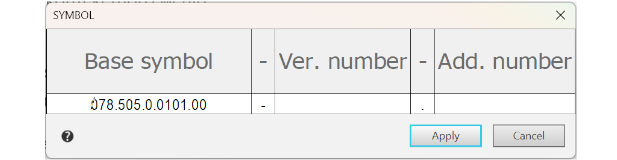
To invoke a dialog for working with a compound designation, use the context menu Edit Designation... command
Enter or edit the required designation elements in the dialog. In the field of separator, only one character can be entered, and only one line – into any other field.
The context menu of the dialog contains the basic commands to handle text. These and other commands are available in the Main menu and on the Parameter Panel.
Setting the document code is possible by both direct entry and selection from the Codes and Names dialog (see section Codes and names).
Having completed entry or editing the designation, close the dialog by pressing the Apply button. In the title block, there appears a designation made up of fragments set in the fields of the dialog for designation entry. If one of the codes present in the File (it contains standard codes) and names was specified in the dialog, then the corresponding document name is automatically added to the Name column. Otherwise, the name must be entered manually. You can also edit file of codes and namesentering the required data into it.
|
System dividers (the first one – a dash, the second – a dot, the third – a space) are not included into a ready designation if the respective part of designation (version number, additional number of version, and the document code) is not set. If instead of system dividers other characters are entered, then they are certainly included into designation. |

If a designation is compound, then an attempt to edit it will result in the automatical display of the Designation dialog. Besides, to invoke the dialog double-click the designation.
|
A compound designation "turns" into a simple one if the fields with the design version number, additional number, and code (separators shall be system-based or be missing) are cleared in the dialog. |
