|
Setting a BOM section |
Scroll |
The BOM Section property determines in which BOM section the BOM object, generated based on properties of the document object, will be located (in the assembly – component or solid, in the drawing – a macro-element, view or fragment insertion).
Value of the BOM Section property can be set in the source file of the document object. A source is available for assembly components and fragments inserted by external reference.
If an object has no source or the value of the BOM Section property is not set in it, then it is determined as follows:
•in the assembly, it depends on the type of component file: parts (*.m3d) are considered to belong to section Parts, and assemblies (*.a3d) are considered to belong to section Assembly units; bodies in the assembly are considered to belong to the Parts section,
•in a drawing, all objects are considered as belonging to the Parts section.
The BOM Section property of a document or its object can be set (changed) in the following ways:
•on the Parameters Toolbar by clicking on the property name Specification section, or by double-clicking in the cell of the property, or by using the Assign Section command from the context menu of this cell;
•on the Product BOM panel by clicking the cell in the BOM section;
•in the Property Editor by clicking the ellipsis button at the right of the selected cell Specification section or by double-clicking the cell with the mouse (see Figure).
After calling the command, the section specification selection dialog appears on the screen.
|
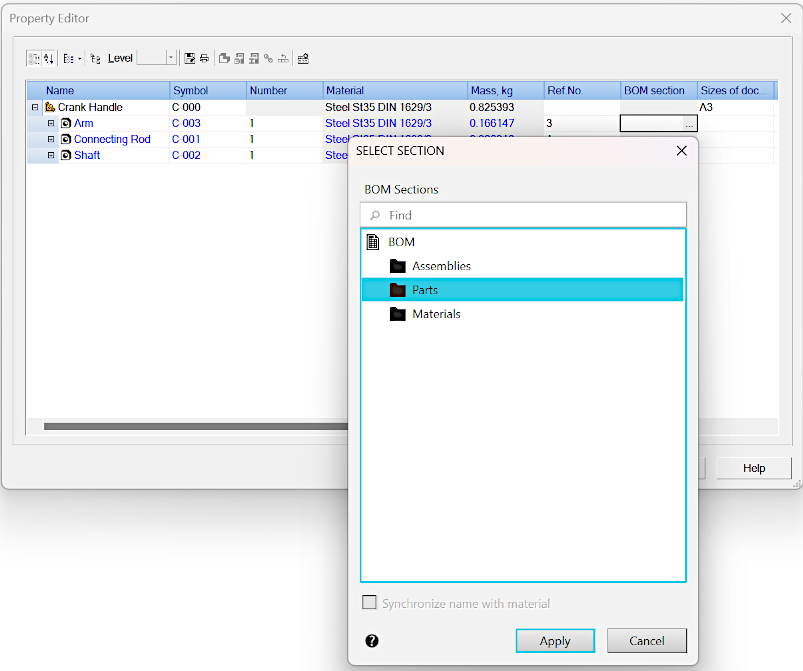
Opening a dialog for selecting the object BOM section
In the dialog, you should select the section and press the Create button, then confirm setting the property value by pressing the Create object button  (in the Parameter Panel) or OK (in the Property Editor).
|
The list of sections available for selection is determined by the BOM style within the current BOM description (see section BOM description). |

