|
Additional Designations |
Scroll |
The coordination axis can have the following additional designations:
•pointers of orientation of an axis,
•chains of marks,
•text designations.
|
|
|
a) |
b) |
c) |
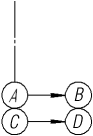
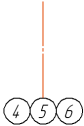
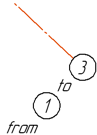
Elements of additional designations
a) orientation marker, b) mark, c) text
Additional designations are attached to the main mark. The main mark – a mark located on the axis. If the coordination axis has no main marks, creation of additional designations is impossible.
Parameters of additional designations of a coordination axis are configured in the Additional parameters sector.
To create additional designations in the process of creation of an axis, do the following actions.
1.Set the Additional Symbols toggle switch to position I (enabled). On the Parameter Panel, the Symbols field will appear.
2.Specify the initial and final points of the coordination axis.
3.Select designation by pressing the required button to the right of the Designation field:
 Add Axis Direction Pointer — allows you to add an axis orientation indicator with a mark,
 Add mark — allows you to add a mark,
 Add Text allows you to add a text designation in the form of a caption.
After pressing the button, a phantom of an additional element will appear in the graphic region. Places of possible attachment of additional designations are marked by points  on the phantom of the primary mark.
4.Indicate the point of element insertion. To do this, move the cursor to the required point . When the point is illuminated, click it with the mouse.
The element Axis Direction Pointer is constructed along the normal to the coordination axis with an arrow directed from the primary mark.
|
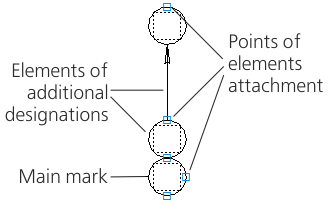
1.Elements of additional designations of axis and the point of their attachment
5.Configure the parameters of additional designation by means of the elements located under the Symbols field. The description of elements is provided in the table.
Controls of parameters for additional designations
The element |
Description |
|
Mark Type |
The group of buttons allows to set an option of rendering an additional mark. Is present on the Parameter Toolbar on adding a pointer of orientation of an axis or mark. The following options are available: •Circle, •Double circle. |
|
|
||
|
||
Length |
The field for setting the length of a pointer of orientation of axis. Is present on the Parameter Toolbar on adding a pointer of axis orientation. The parameters of an arrow and the default length of pointer are determined by the values set in the subsection Coordination Axes — Orientation Pointer of the current document settings dialog. |


6.Enter the text of additional designation (see below).
7.The name of the created designation will appear in the Symbols field. To attach the following element, press the required button to the right of this field.
Input of text of additional designation
Input of text of additional designation of the coordination axis is performed in the Subprocess of text input.
During creation of text designation, the subprocess of text input is started automatically after indication of the point to insertion designation.
While working in the Add Text subprocess, you can generate a designation caption and tune its look and feel, for example, to select the font, set the height of characters, etc.
To enter the caption text in the process of creation of a pointer of orientation of axis or mark, click in the Text field in the Additional parameters sector or in a text box on the phantom of the created element, or press any of the alphanumeric keys on the keyboard.
The caption text is entered into a text box on the phantom of additional designation. Double click in this field invokes the Character and Digit commands containing the list of letters and numbers for designation of mark.
If the length of a line of the input text turns out to be more than the diameter of a mark circle, there will be an automatic reduction of width of characters in the caption.
After you've inputted and formatted the annotation text, press Create item  button.
