|
General Information |
Scroll |
When constructing all arrays but mirrored array and array by sample, you can change form and dimensions of array instances in following ways:
•Changing dimensions values of instances,
•Changing the values of instance variables using the table of modifiable variables.
Example of changing array instances dimensions for an array by curve is given on the figure. The copied object is a bumping operation. A new extrusion distance value is specified for each copy of the operation.
|
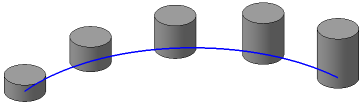
Example of changing dimensions of array instances in bump operation
(new extrusion distance value is specified for each of the instances)
|
For some objects it is impossible to change their variables. Such objects include: thickening operation, array, group of curves or points and some others. Copies of these objects in an array cannot be different from their originals. |

Except variables of the copied object, variables of the following objects which participate in its construction can also be edited:
•sketches (if there are dimensions with variables created in them),
•auxiliary planes,
•curves (except splines and broken line),
•points.
For example, you copy an extrusion element whose sketch is built on a plane parallel to the XY plane, and extrusion depth is determined by the point position in space. For array instances, you can set new values of variables that define the sketch dimensions, the distance from its plane to the XY plane and the coordinates of the point up to which extrusion is performed.
The "copied object variables" will further mean both these variables themselves and variables of objects which participate in building the copied object. "Instance variables" will denote a set of variables similar to the variables of object being copied.
|
Instance parameters may be changed after array creation as well. To do this, you can use the Variables toolbar or derivative dimensions. |

