|
Type of section move |
Scroll |
When moving an object-section or a cutting tool solid along the trajectory (for setting a section/solid, see section Element Section by Path) its orientation may change or remain constant. This depends on the type of the section/solid movement.
To set the required type, in the Section Movement group of the Parameters Panel, click the corresponding button:
Features of building an element by path for various types of section movement are described below.
If the path lies on a surface, then you can use a normal to this surface to determine the position of the section during movement. To do this, enable the Consistent with the surface normal option. This feature is available for the methods Keep slope angle and Orthogonal to Path. More details on the position of the section, consistent with the normal...
Move while maintaining the slope angle
If in the Section Movement Preserve Inclination Angle  button is pressed, then the section (cutting body-tool) is moved so that at any point of the trajectory the inclination angle of the section (body) to the trajectory is constant and equal to the initial inclination angle. An example of sketch section movement is shown in the figure.
|
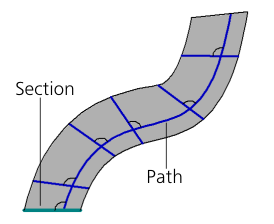
Moving a sketch-section with preservation of the slope angle
If the path is a curve on surface, you can build with account of direction of the normal to this surface. More details on the position of the section, consistent with the normal...
If Parallel to itself button is pressed in the Section movement group  , then the section (cutting tool body) moves as follows:
•The section is moved so that at any point of the trajectory its plane is parallel to the plane in which the object selected as the section is located. An example of sketch section movement is shown in the figure.
•A solid used as a cutting tool is moved so that at any point of the path it is located parallel to its initial position.
|
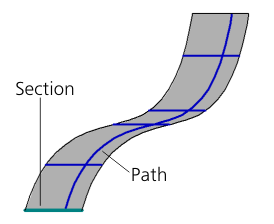
Moving the sketch-section by path parallel to itself
|
You cannot move a section parallel to itself if the path has points in which the tangent to it is parallel to the section plane. |

Only a section object can be moved orthogonal to path. When cutting with a solid by path Option is not available.
If in the group Section Movement Orthogonal to Path  button is pressed, then the movement is performed as follows:
•for a section located perpendicular to the path — the building result will be the same as when the Keep slope angle,
•for a section located at an arbitrary angle — the section is rotated so that its plane becomes perpendicular to the trajectory, and then it is moved along the trajectory maintaining the 90° slope angle (an example of such building for a sketch section is shown in the figure). Therefore, the face of the element in the starting point of the path is perpendicular to the path regardless of the angle of the source object position. The position of the object itself remains unchanged.
|
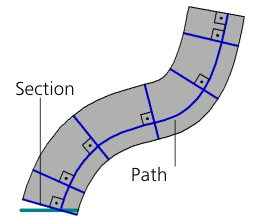
Moving the sketch-section by path orthogonal to path
If the path is a curve on surface, you can build with account of direction of the normal to this surface (see next section).
Changing the section position consistent with the direction of the normal to the surface
If a curve lying on a surface (for example, an edge, projection curve, surface spline) is selected as a path and the Keep slope angle or Orthogonal to Path, then the option Consistent with the surface normal is present on the Parameters panel.
Enable this option to ensure that in each point of the path the section is rotated relative to its initial position consistently with the direction of the normal to the surface in this point. In this way, when moving by path the section rotation angle will change consistently with the change of the normal direction.
This option applies both to section objects and to solids used as cutting tools.
|
|
|
a) |
b) |
c) |
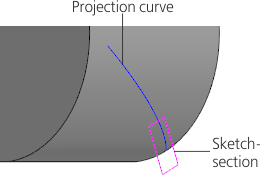
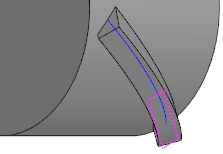
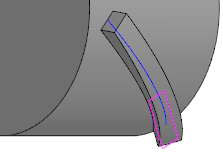
Building an element by path with account of the option Aligned with the normal to the surface:
a) source objects, b) option disabled, c) option enabled
