|
Section triangle parameters |
Scroll |
The conical curve in each section inscribes into the section triangle and touches its sides at points lying on the guide curves. The base of the triangle is the segment connecting these points, i.e., a conical curve chord, while lateral sides of the triangle define the slope of the tangents to the conical curve.
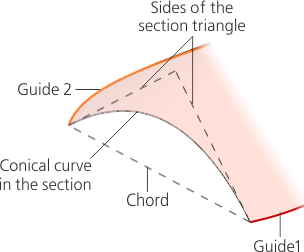
Section triangle
The section triangle can be specified either by defining the slopes of the sides with respect to the chord, or by the vertex.
To set the parameters of a triangular section, use the elements of the Triangle group located in the Section section of the Parameter Panel.
You can select a construction method for lateral sides of the triangle using the Tracing mode group. The following options are available.

On selection of the method On the sides, the slope is set separately for each of the lateral sides of the section triangle. At the same time, the Side Slope 1 and Side Slope 2 groups, containing identical sets of elements, are displayed on the Parameters toolbar.
There are two options for determining the slope angle of the triangle sides:
•From the object — to determine the angle of inclination, the edge or plane that contains the object selected as the guide is specified. For example, if the guide is an edge of a face, then this face can be selected to define the slope, and if the curve is in the sketch, then the sketch plane can be selected, etc. The slope is defined by the tangent or normal to the specified face/plane at the point of intersection of the guide with the section plane.
•From the chord — to determine the angle of inclination, the angle between the side of the triangle and the chord of the conical curve is used. This angle is calculated for each position of the section in accordance with the specified function.
The tilt determination option is selected using a switch From the Object/From the Chord.
|
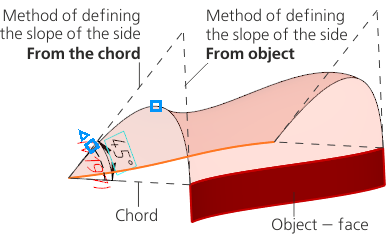
Methods of defining the slope of the section triangle sides.
Procedure for parameters configuration for the method From the object
1.Specify a face or a plane in the graphic area. You can specify the face the edge of which is the corresponding guide and the face or plane on which the guide lies.
The name of the selected face/plane appears in the Surface field.
2.If required, change the plotting condition using the Condition group. The group contains the following buttons:
 Tangential (pressed by default),
 Perpendicular.
Procedure for parameters configuration for the method From the chord
1.Using the Function Type group of buttons, select the type of function that will be used to determine the slope angle of the sides of the section triangle, and set the parameters for the selected function (for instance, for a linear or cubic function, you would input the angle values at the initial and final positions of the section).
To learn about setting the function of changing a parameter in detail...
|
Notes on angles setting: •The angle value should be withing the range of -180° to 180°. •Slope angles of both sides of the triangle should be of the same sign (both positive or both negative). •The sum of the slope angles should be less than 180°. |

2.If required, you can draw the side of the triangle in a mirrored view relative to the chord. To do this, press the Change Direction  button located next to the angle value input field (in case of using the curve law, the button is located next to the Law field; it is present on the Parameter Panel when the field is populated).
|
If the direction of plotting is changed for one side of the triangle, then it automatically changes for the other side too. |
 'By vertex' method
The By vertex method involves that the slope of the sides of the section triangle is determined using the vertex curve.
Vertex curve is the geometrical locus of points of intersection of tangents to a conical curve at all positions of the section.
You can select the following as the vertex curve:
•3D curve, consisting of a single contour (including a polyline or its segment, curve having subordinate objects – curves,
•sketch line,
•edge,
•chain of above mentioned objects in any combination.
The section triangle sides will be positioned so that they converge at the intersection of the section plane with the vertex curve.
|
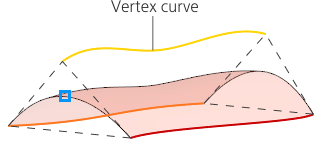
Using the vertex curve for defining the slope of the section triangle sides.
If the By vertex construction method is selected, then the Vertex curve field will be shown in the Parameter Panel.
Select the desired curve (chain of curves) in the graphic area or in the Model Design Tree. The selected objects appear in the field Vertex curve.
