|
Smoothness check mode |
Scroll |
To display the model in the smoothness check mode, use the Smoothness check  command.

After calling the command, the appearance of the model will change depending on the chosen display method:
•Zebra – in the model's facets, a sphere with applied stripes is reflected (this method is used by default).
•Environment reflection – a sphere with a raster image from a file is reflected in the facets of the model.
The display method can be changed when setting the smoothness check parameters.
|
|
a) |
b) |
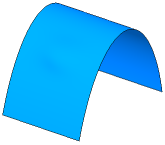
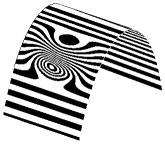
Checking smoothness of the surface (the surface is slightly convex)
a) shaded wireframe display of the model — the convexity is almost invisible;
b) model smoothness check mode (Zebra) method – the convexity is clearly visible
To close the smoothness check mode call the Check smoothness command once again.
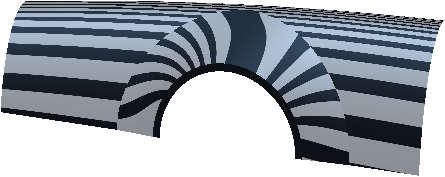
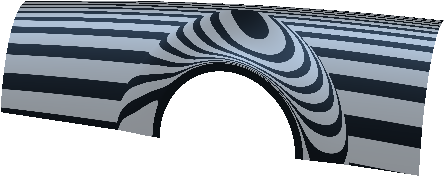
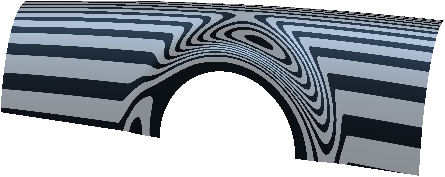
Evaluating smoothness of face joints using a "zebra"
Facets mating condition |
The shape and position of "zebra" stripes that corresponding to the mating condition |
|
Not specified |
Stripes on facets not joined:
|
|
By tangent |
Stripes on faces are jogged:
|
|
Smooth |
Stripes on facets are joined smooth:
|
|
After activating this mode, the following model display modes become unavailable: Wireframe, Hidden Lines Removed, Hidden Lines in Gray. The Shaded mode activates automatically and becomes unavailable too. |

Using the model smoothness check mode results in additional consumption of memory and operating system resources, which ultimately slows down KOMPAS-3D. |
