|
Leader caption |
Scroll |
The callout used for designating multilayer constructions is created by the Leader caption  command.

Step-by-step instructions
1.Specify the point to which the first branch of the leader caption points.
In the graphic region, a designation phantom will appear.
2.Specify the starting point for the landing.
|
To set the position of designation points, you can use snaps and geometrical calculator. |

3.Create the required number of branches of the leader line. Details...
4.Enter the text of a leader caption. To that end, click in the Text field on the Parameter Panel or in a text box on the phantom of designation, or press any of the alphanumeric keys on the keyboard. The Add Text subprocess will be started. Details...
5.Set up the parameters of leader caption using the elements located in the Additional Parameters section.
6.To complete creation of the designation, click Create Object  .
.
7.To complete operation of the command, click Finish  .
.
|
|
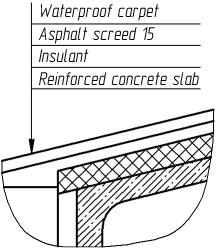
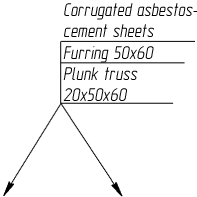
Examples of a leader caption
