|
Using sketches, their objects, and areas limited by contours |
Scroll |
A sketch may contain one or several chains of objects — sketch contours.
Notes on sketch objects combination combined into contours. For example, if you have drawn two segments in a sketch that connect at a vertex, then they are considered a chain and form one contour. If the segments intersect, then there will be two contours. If several lines have a common vertex, several contours will be formed in the sketch.
|
Sketch objects are combined into contours by the system. |

In various operations you can use the following items:
•entire sketches


•separate objects (not contours) of a sketch or parts of objects formed as a result of their intersection or tangency,
•areas bounded by specific sketch contours or obtained by tangency/crossing of contours
In some operations, you can use only sketches containing a single contour. For example, in the Rib. When you select a sketch with multiple contours, an error message will be displayed on the screen.
There are operations with no restrictions on the number of contours in a sketch. E.g. a sketch containing several non-intersecting contours can be selected as a section of an extrusion element (figure Construction of the extrusion element, a, b). The result will be a solid , consisting of parts.
In several operations, you can use not only the entire sketch, but also separate regions limited by contours of the sketch or obtained as a result of intersection/tangency of the contours. Here is the translation of the given text:"For example, when designing the extrusion element indicated in the previous paragraph, you can use not the entire sketch, but one of the regions limited by contours (Figure Construction of the extrusion element, in ).
|
|
|
a) |
b) |
c) |
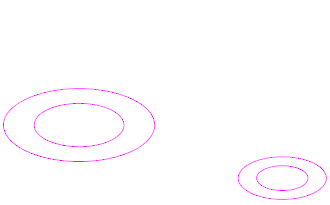
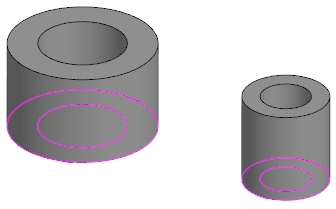
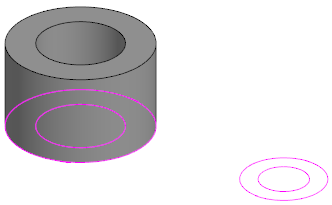
Building an extrusion element:
a) a sketch containing several non-intersecting contours,
b) the element section is the entire sketch,
c) the element section is one of the sketch areas
If the contours in the sketch are tangent or intersecting, and the result is closed areas, then these areas can also be used in operations (see the figure below).
|
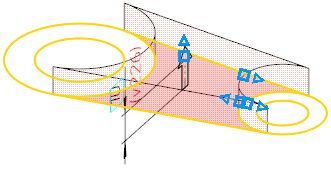
Selecting an area formed by tangency of contours
Requirements to sketches in various operations are detailed in the specific sections with those operations.
|
If a sketch is selected as a section of an element during the operation, then this sketch is hidden after completing the operation. If a section is an area in a sketch, then the sketch remains visible. If required, you can hide it after you complete building (see section Managing visibility of objects). |
See Also
