|
Print Filter Settings dialog box box |
Scroll |
The dialog allows to enable or disable printing of document objects depending on their type.

 in preview mode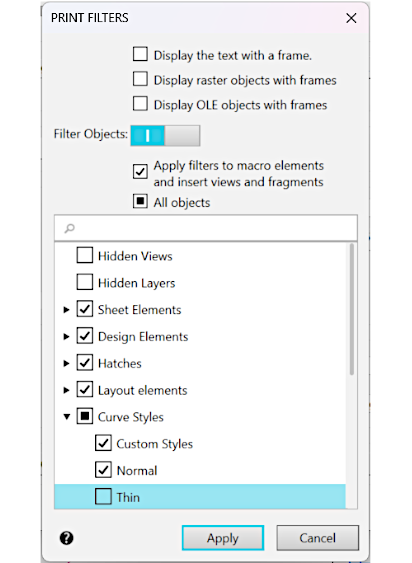
Controls of the dialog for setting up the print filters
The element |
Description of setting |
|
Display the text with a frame. |
Enabling the option means that instead of the text in the document its dimensional frame will be printed. |
|
Display raster objects with frames |
Enabling the option means that instead of bitmap objects in the document their dimensional frames will be printed. |
|
Display OLE objects with frames |
Enabling the option means that outline boxes will be printed in a document instead of OLE objects Their boundary frames will be printed in the document. |
|
Filter objects |
The toggle controls the application of filters. •If the toggle switch is in the 0 position (disabled), filters will not be applied and all objects will be printed. •If the switch is in position I (enabled), then filters will be applied, and control elements for enabling/disabling object printing will appear in the dialog. |
|
Control elements when switch is onFilter objects |
||
Apply filters to macro elements and insert views and fragments |
The option allows to control use of filters to the objects which are part of macro-elements and to the inserted views and fragments. If the option is enabled, filters will be applied to these objects. If the option is disabled, these objects will not be regarded as independent items to be filtered. |
|
All objects |
The option allows to enable/disable printing of all document objects contained in the dialog list. It may be in one of the three states: •not defined •If this option is enabled •disabled If the state of the option is undefined, a click on the option will disable it, the next click will enable it. |
|
List of elements of the current document |
The list contains names of elements and groups of elements of the document. To expand (collapse) a group of elements, click on the You can change a set of objects for printing, enabling and disabling the respective options. The behavior of the option in the row with the name of the group of elements is similar to the behavior of the option All objects (see above). For quick selection of the objects, you can use the search bar at the top of the list. |
|
 (by default) — the list contains both enabled and disabled options (objects with enabled options
  , all the options in the list are enabled (all document objects will be printed),
 – all options in the list are disabled (

To complete work in the dialog with saving changes, click the Apply button.
To exit the dialog without saving changes made, press the Cancel button.
