|
Template not found |
Scroll |
This message appears when creating a new KOMPAS document, if the system can't find a template for new documents of a given type (templates are configured in the Document templates). For example, a template file can be deleted, moved, or renamed. The full template file name is displayed in message.

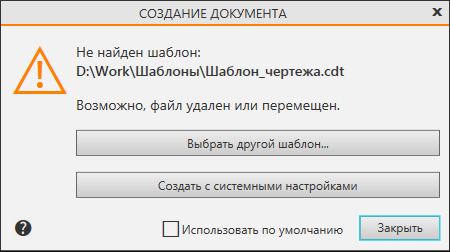
Select the desired action by clicking one of the dialog buttons. If necessary, before clicking the Choose a different template... or Create with system settings button, enable the Use as default option.
•The Select another template... button allows you to use a different template file to create the document in place of the one not found. After pressing the button, a files open dialog appears on the screen, in which you need to specify the replacement template file. You can select the file with the appropriate extension. More details about templates...
If the option Use as default is enabled, the selected template file will be automatically assigned to new documents of the corresponding type, and its path will be recorded in the Document Templates dialog.
If this option is disabled, the selected template will be used only once. You can't change file path in this dialog.
•The Create button with system settings allows to create a document with default settings.
If the Use as default option is enabled, the path to the template file will be removed in the Document Templates dialog.
•The Close button allows for interrupting the creation of a new document.
