|
Dialog for setting up parameters of writing to EMF file |
Scroll |
This dialog appears on the screen if the Enhanced Metafile (EMF).
The dialog allows you to configure the parameters of writing to a file of the selected format.

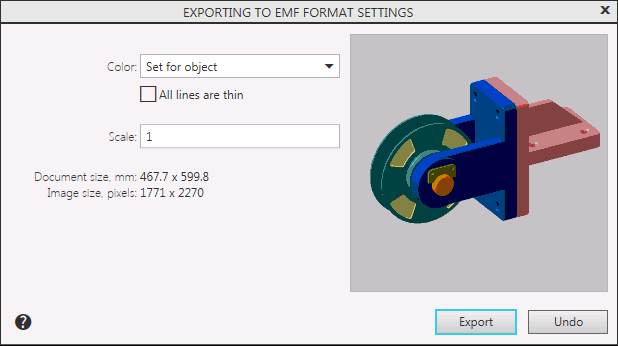
Description of Controls
The element |
Description |
|
Color |
A list from which you can select the color of the image. More details about the available options... |
|
All lines are thin |
This option allows to save all lines with the thickness set for printing thin lines in the dialog for setting up system lines. The default the value (thickness on paper) is 0.18 mm. If this option is disabled, the lines are recorded with individual thicknesses for printing. Line thickness on paper is a line style option. For system styles, it is set in the system lines settings dialog, and for user styles when setting them. The line style also contains the “thickness on screen” parameter. Its value does not affect the export result. The state of the option All lines Are Thin does not affect the thickness of the lines of the font. |
|
Scale |
The field to set the image scale. |
|
Document size, mm |
Page image dimensions in mm. |
|
Image size, pixels |
Page image dimensions in points. This value depends on the specified scale and resolution. |
|
Preview Window |
The window is used to display the page selected for writing. |
When you have finished setting up, click Export to start recording. To cancel saving, click Cancel.
|
Writing to the EMF format follows the print filters. For example, the created file will contain only those objects of the KOMPAS document for which printing was enabled. |

|
Since the size of the file in the EMF format is pre-estimated in points, a message may appear about the impossibility of writing a raster file. Details... For the export to be possible, the image must be zoomed out. |
