|
Designation dialog box (designation input when working in the Property Editor and Document Manager) |
Scroll |
This dialog is used to enter and edit a composite designation document or object (including model execution). The specified text becomes the value of the system property Designation for a document or object.

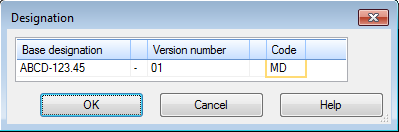
This dialog can contain the following fields for input of designation parts: Base symbol, Version number, Additional number of the version and Code. The set of fields depends on which document or object the dialog is being called for.
Make the necessary changes to the field contents. The basic designation, number and additional number of the version are entered from the keyboard. A document code can be entered from the keyboard or selected from the code list in the Codes and names. This dialog is invoked by the Insert part number and item name... command in context menu of the field Code or double click in this field.
|
When changing the basic designation and code for model execution, pay attention to Notes on transferring changes to other versions. When changing the version number, keep in mind that the number must be unique within the document. Otherwise, the completion of work in the dialog with the preservation of changes is not possible. |

There are default separators between parts of the designation. ( When working with the model, default delimiters can be specified when setting). You can enter one arbitrary character instead of the default delimiter.
Please note that the separator in front of the Code field is a space. To change the divider, enter an arbitrary character into the respective field of the Designation dialog. If it is required to create designation without a separator, delete a space.
Separators are not included into a ready designation if the respective part of designation is not set.
|
There must be a separator between the base designation and the execution number. If a separator is deleted (the field is left blank), then the deleted separator is restored in the designation after closing the dialog box. |
To finish the work in the dialog with saving the changes, click OK.
Click Cancel to discard all changes and close the dialog box.
