|
Possible issues when loading a print job |
Scroll |
Various issues may occur when you try to load a print job.
If the print job file has errors and cannot be loaded, the message Print job file contains errors and cannot be loaded will appear.
If there were some problems encountered when loading the print job but it is still possible to print then an Information window.
|
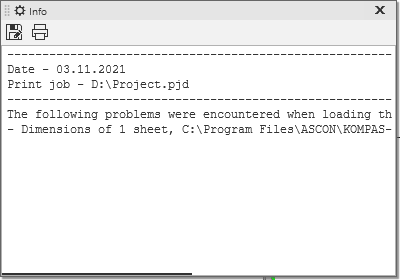
This window contains the following:
•current date,
•full filename of the print job,
•list of issues encountered while loading.
The following issues may occur when you try to load a print job.
•Data on the output device are missing in the print job. The current output device will be used. This message appears in the information window if the print job has no data about the output device (these are configured in the Print Settings dialog box. In this case, the current output device or the default device will be used for printing.
•The output device specified in the print job is not present in the system. The current output device will be used. This message appears in the information window if the printing device specified in the print job is not present in the system. In this case, the current printing device or the default device will be used for printing. The printability setting setting you've set using the Mode for selecting pages for printing command is ignored.
•Page parameters are missing in the print job. Output device settings will be used. This message appears in the information window if the print job has no page settings (size and orientation) which are set up in the Print Settings dialog box. In this case, the output device settings will be used when loading the print job.
•Print output filter settings are missing in the print job. Current filter settings will be used. This message appears in the information window if the print job contains no settings of the print filters which are set up in the Print Filter Settings job. In this case, the current filter settings will be used when loading the print job.
•No settings for some filters in print job. Current settings will be used for these filters. This message appears in the information window if the print job contains no settings of some print filters which are set up in the Print Filter Settings job. In this case, the current filter settings will be used for the filters with missing settings when loading the print job.
•Data on output parameters are missing in the print job. Current output parameter settings will be used. This message appears in the information window if the print job contains no data about the print settings which are set up in the Print Settings job. In this case, the current settings will be used when loading the print job.
•In the print job, data on some output parameters are missing. Current values will be retained for these parameters. This message appears in the information window if the print job contains no data about certain print settings which are set up in the Print Settings job. In this case, the current settings will be used for the parameters with missing settings when loading the print job.
•Sheet <sheet number> not found in file <full filename>. This message appears in the information window if one f the document sheets specified in the job was not found when loading the job. In this case, the job will be loaded without this sheet. If all the sheets of all the documents specified in the job cannot be found, the loading of the job file is aborted.
•Print area for sheet <sheet number> is outside the sheet margins in file <full filename>. This message appears in the information window if you're trying to print the selected area of a sheet but the print area is outside the current borders of the sheet. In this case, the job will be loaded without this sheet. If this error is found in all the sheets of all the documents specified in the job, the loading of the job file is aborted.
•File <full filename> not found. This message appears in the information window if one f the documents specified in the job was not found when loading the job. In this case, the job will be loaded without this document. If all the files specified in the job cannot be found, the loading of the job file is aborted.
•Cannot open file <full filename>. This message appears in the information window if one of the documents specified in the job is found but cannot be opened. In this case, the job will be loaded without this document. If all the files specified in the job cannot be opened, the loading of the job file is aborted.
•Sheet <sheet number> size has changed in file <full filename>. This message appears in the information window if a difference between the recorded sheet sizes and the current sheet sizes was detected when loading the job. After loading, the sheets are displayed with their current settings. The position of the sheets in the print field does not change.
|
If you are loading a print job from the main window and all the documents in this job contain errors or none of these documents are found then loading of this print job will be aborted. A message will appear on the screen: Could not generate data for output when processing the selected print job file. For more detailed information, enter the preview mode and load this file. |

|
To print DXF or DWG documents, you need to open them and then print from the main window or from the Preview mode. You cannot print these files using print jobs. |
