|
Change position of a list of toolbar sets |
Scroll |
By default the list of toolbars is located in the left part of the Toolbar area of the window (see Figure). Each row in this list contains a set name and a corresponding icon as shown on a Figure a (a number of sets and their order in the list are being customized). The Toolbar Panel displays only three first rows of the list (see Figure – rows with gray background). If you need to see other rows, click the icon  at the end of the displayed list.
You can move the list to the canvas and position it near the left or right window border in KOMPAS-3D. The detailing of the list will also change – in those position it contains a column with buttons to switch sets, as shown on the Figure b.
|
|
a) |
b) |
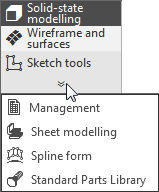

Appearance of toolbar sets list:
a) list is in Toolbar Panel; b) list is near the window's border
Changing position of the toolbar sets list may be performed in the main window or in the interface setting mode.
To move the list, call the Position on the left command or Position on the right from its context menu. The list moves to the indicated window border.
If you want to return the list back to the Toolbar Panel, call the Return to the Tool Area command from its context menu.
See Also
