|
Setting the fillet radius of boundary curve |
Scroll |
When selecting the method Along the boundary curve, the rounding radii are defined via the boundary curve. A fillet radius is calculated in each point of an edge so that the provided curve becomes a boundary of the fillet surface.
To use this method for defining a fillet radius, click Along the boundary curve  in the Tracing mode group and specify the curve.
The following can be selected as a boundary curve:
•edge,
•spatial curve,
•curve in sketch,
•chain of the above objects in any combination.

When you specify a boundary curve, its name is displayed in the Curve field, and a fillet phantom is displayed on the screen.
Below the field Curve is the option Select tangent edges. This option is used for automatic selection of curves that make up the chain:
•If the option is enabled, then after specifying one of the curves, all other curves of the chain will be defined automatically,
•If the option is disabled, then all the curves that form the chain are specified one by one.
|
|
a) |
b) |
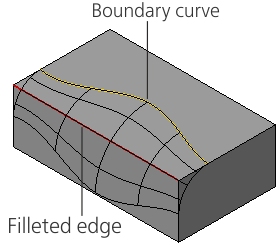
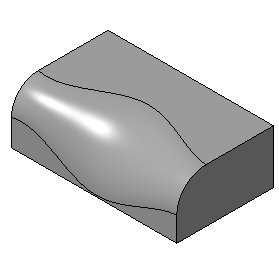
Example of variable radius fillet: By boundary curve:
a) constructing a fillet, b) the final result
