|
Layer panel |
Scroll |
The Layer panel is used to work with layers of the model document. and layers of sketch. To turn on/off the display of the Layer panel, call the command Setting — Panels — Layers  or press the key combination <Ctrl+L>.
You can also enable/disable the display of the Layer panel using the command Layer management.

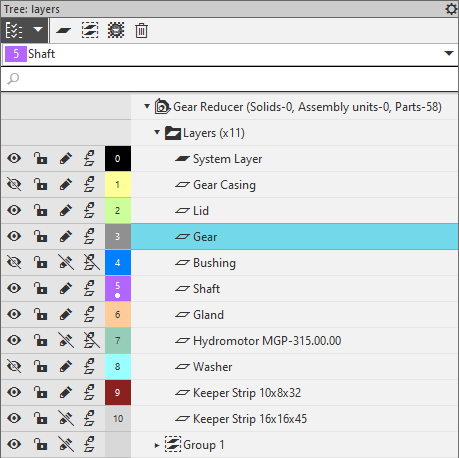
The Layers panel contains lines with the names of layers and layer groups created in the current model. The lines display the property values of the layers as icons, as well as fields with layer numbers and colors. The current layer is additionally marked with a dot in the field with the layer number. The name of the current layer is also displayed in the field at the top of the Panel. The tool area contains buttons that allow you to perform various actions with layers. The following operations are available:
•creating of layers,
•layer name and number change,
•setting parameters of displaying the layers,
•deleting layers.
The Layer panel allows you to toggle the display of non-empty or empty layers. This is described in the section below.
The icon of a non-empty layer in the Layer panel is black. The icon of an empty layer differs from the icon of a layer with objects and is a gray outline. The display of non-empty and empty layers in the Panel can be controlled. To do this, use the button Tree structure  in the toolbar area. If the button is pressed, all layers, non-empty and empty, are displayed on the Panel (see Figure a). Clicking on the icon
  to the right of the button opens a menu with the Non-empty layers and Empty layers commands. A «check mark» is displayed next to the name of each command. To turn off the display of layers, call the desired command from the list. The «check mark» next to the command name will disappear (see Figure b), and the corresponding layers will no longer be displayed in the Layer panel. To turn on the display of layers again, call the command again.
|
|
a) |
b) |
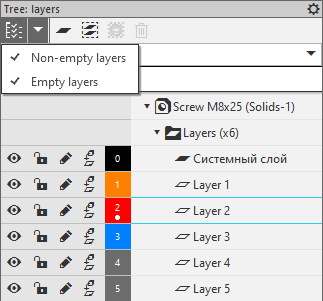
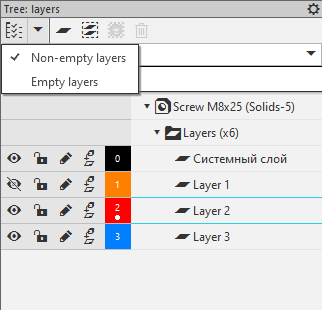
Layer display management on Layer panel:
a) display of all layers is enabled, b) display of non-empty layers is disabled
