|
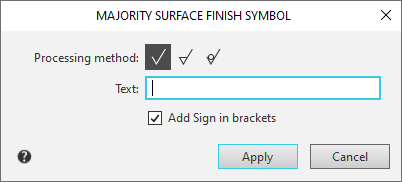
Majority Surface Finish Symbol dialog |
Scroll |
In this dialog, you can enter or edit majority surface finish designations for the current document.


Description of Controls
Name |
Description |
|
Processing method |
A group of elements that allows you to select the type of roughness symbol. To select the desired option, click the corresponding button. • • • |
|
Text |
In this field, you can manually enter the text for the roughness symbol or select text from the user menu. The user menu is accessed by double-clicking and contains the roughness parameters Ra, Rz, Rmax, and their values. |
|
Distance to Symbol |
In this field, you can enter the value of the vertical distance from the title text to the surface finish symbol. This field is shown in the dialog if compliance with the previous edition of GOST2.309-73 was selected when Configure the settings for designation of surface finish Compliance with the previous edition of GOST 2.309–73 was selected. |
|
Add Sign in Parentheses |
Enable this option if you need to draw the sign in parentheses. |


Once you configure the majority surface finish symbol, click OK. Click Cancel to discard all changes and close the dialog box.
