|
System settings administration |
Scroll |
In KOMPAS-3D, you can administratively manage system settings—that is, the parameters located in the System section of the general settings dialog. The administrator marks the parameters that cannot be changed in normal mode—that is, while the user is working. The settings configured by the administrator are stored in a special file—the administrator settings file. The procedure for creating and using this file is described below.
Creating an administrator settings file
To create an administrator settings file, launch the KOMPAS-3D system as an administrator and select the Settings — Parameters command. The Parameters dialog box will then appear on the screen. It differs from the dialog box used by regular users in that it contains options to the right of most parameters in the System section. By enabling an option, the administrator prevents users from changing the corresponding parameter: when launched as a user, the parameter will be unavailable, and an icon will appear next to it Value modification locked by administrator  . There are some settings that the administrator cannot disable — an icon an icon is displayed Value defined by user
  .
.
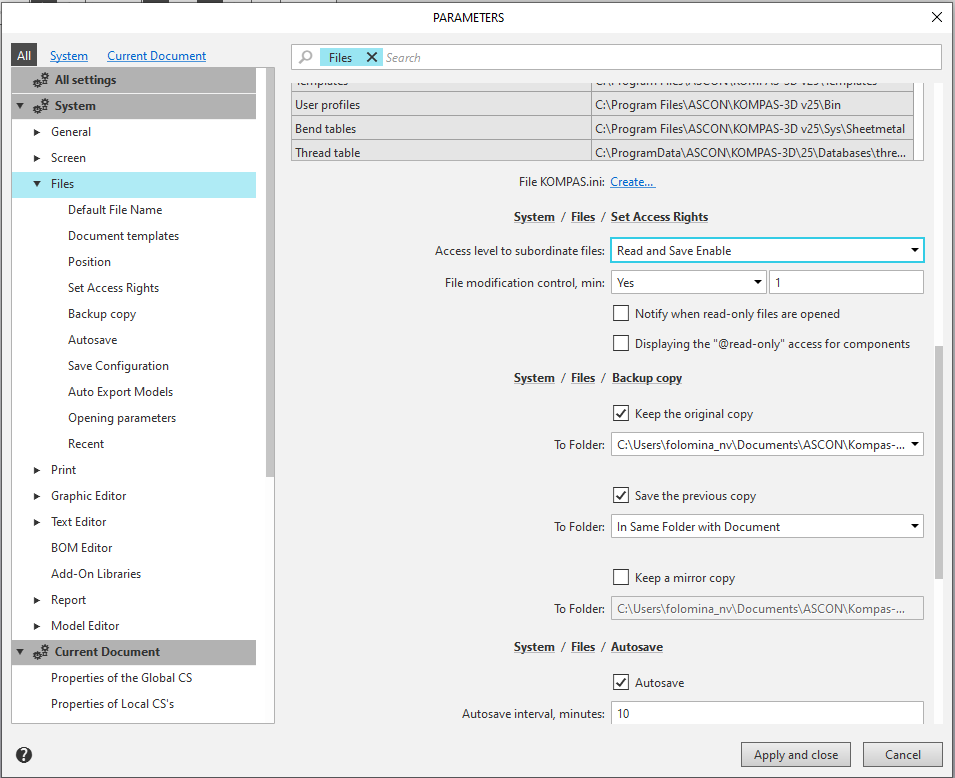
After clicking the Apply and Close button, a standard file save dialog opens, in which you must select the file type Administrator settings file (*.adm)", specify a file name, and choose a folder to save it in. The following information is written to the administrator settings file:
•the values of modified and locked settings,
•for locked settings—the lock flag.
|
The setting that determines whether to use local or online help has a special feature: since its value is stored in the config.xml file, it is not written to the administrator settings file. However, a flag indicating that this setting is locked can be written to that file. |

When the administrator settings file is saved, a second file—KOMPAS_adm.xml—is automatically created, containing the path to the newly created administrator settings file. The KOMPAS_adm.xml file is placed in the folder where the execution file is stored.
If you need to use the same administrator settings on multiple workstations, you can place the administrator settings file on a shared resource and copy the KOMPAS_adm.xml file to the folder containing the executable file on the workstations.
Using the Administrator settings File
When KOMPAS-3D is launched on behalf of the user, the path to the administrator settings file is read from the KOMPAS_adm.xml file, and the system checks for the presence of a *.cfg file. Then:
•If a *.cfg file exists, only the values for locked settings are taken from the administrator settings file. The values for the remaining settings are retrieved from the *.cfg file.
•If there is no *.cfg file, the values for locked and unlocked settings are taken from the administrator settings file. The remaining settings are assigned their default values.
The administrator settings file is read once per KOMPAS-3D session—at the start of the session, i.e., when KOMPAS-3D is launched.
If it is not possible to retrieve data from the administrator file when loading KOMPAS-3D, a message explaining the reason for this situation is displayed (for example, an error reading the file path), and the last used administrator settings are restored.
|
•When loading system settings saved in a *.pfl file, only the values of those settings that have not been locked by the administrator are retrieved from that file. •When the system settings are reset, only those parameters that have not been locked by the administrator will revert to their default values. |
