|
General |
Scroll |
1.The administrative control of the KOMPAS-3D system parameters located in the System section of the general configuration dialog has been implemented. In administrative mode, you can mark parameters that cannot be changed in normal mode—that is, while the user is working. Users will still be able to change unmarked parameters as before, at their discretion.

Blocking system parameters in the administrative mode of operation
2.You can now choose not to save the list of recent documents or display it on the Home page. You can re-enable both the saving and display of this list at a later time if needed.

Disabling and enabling the saving of a list of recent documents on the Home Page
3.The administrative management of the KOMPAS-3D system parameters located in the System section of the general configuration dialog has been implemented.

Resetting system parameters
4.When filling out the tables in the main header of document sheets, users can now enter vertical text into the cells. Previously, there was no command available for this.
5.We've added the ability to quickly navigate to the technical requirements settings within a document. The corresponding command is located in the Layout menu Technical notes and in the context menu for technical requirements.
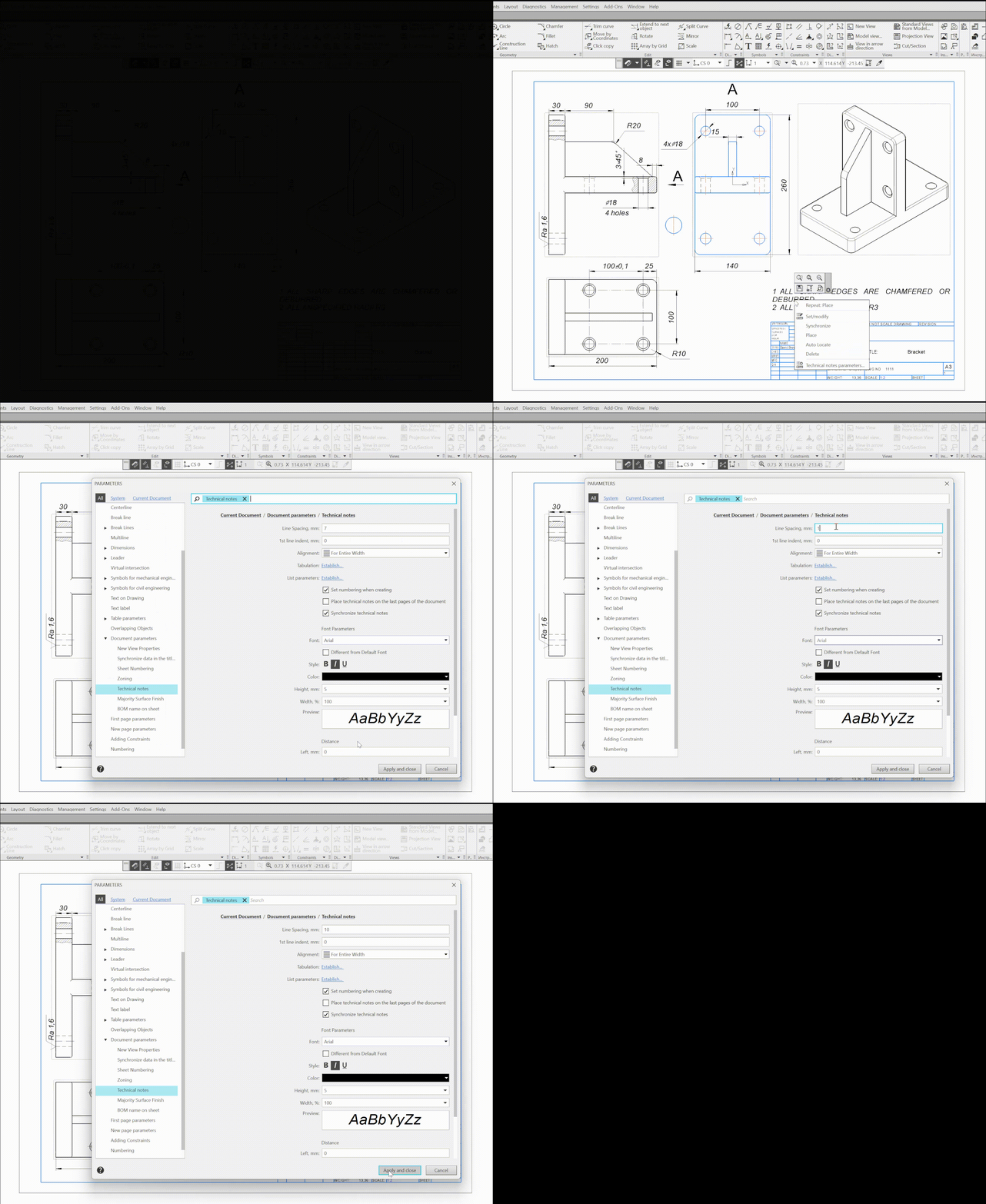
Editing parameters of technical requirements in a drawing
6.It is now possible to host KOMPAS-3D Help Systems on a web server within a company’s local area network. This allows users to access the reference system without installing it on every workstation and does not require an Internet connection. The steps required to access the help system from the local area network are described in the KOMPAS-3D Help System.
