|
Additional features when building auxiliary lines |
Scroll |
Intersection points
During auxiliary constructions it may be necessary to mark the points of intersection of lines with each other and with other objects. To do this, after calling the command build direct enable option Intersection points on the Parameter Panel. When creating a straight line, the system automatically sets intersection points of this straight line with all graphic objects lying in active layers of the current view.
|
|
a) |
b) |
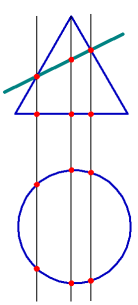
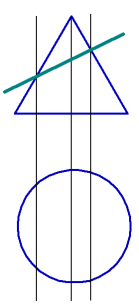
Construction of auxiliary straight lines
a) with setting, b) without setting auxiliary points
Style of automatically set points – Construction.
If necessary, they can be removed by one command along with other auxiliary elements. Details...
|
If you need to mark only the intersection points of a line with certain objects instead of all the intersection points, leave the Intersection Points option disabled, and after completing the construction, use the command. Intersection Points of Two Curves. Command All Intersection Points of Curve Allows you to mark all points of intersection of the auxiliary line. |

Remembering parameters
This is available for Construction Line, Parallel Straight Line and Perpendicular Straight Line.
When sequentially building lines that have a number of identical parameters, the values of these parameters can be remembered until the command is completed. To do this, specify the parameter values common for the objects, click the  Remember Status, after which continue the construction. More information about remembering parameters...
Example 1. Construction of several lines passing through the same point.
1.Call the Construction Line command.
2.Set the first point of the line.
3.Click Remember Status.
4.Consistently specify the second points of the lines.
Example 2. Creating several straight lines parallel to the same straight-line object.
1.Call the Parallel straight line command.
2.Specify Straight Object.
3.Click Remember Status.
4.Sequentially set the distance from the straight line object to the new straight lines in the Distance field.
