|
Current layer selection |
Scroll |
To set a layer as current, use one of the following methods.
•In Document tree:
•select the required layer from the list of layers (see the Figure)
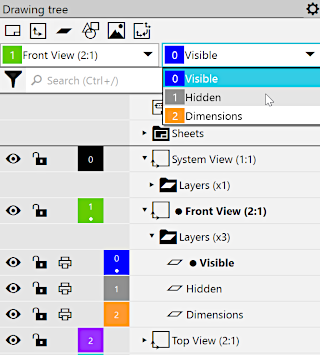
•Click on the field with the layer number or call the Make Current command from the layer's context menu (if the layer is already current, the command is absent).
•in the graphic region of a drawing (only for active and visible layers):
Select any object of the required layer and run the Switch to Object Layer command from the context menu; the command is unavailable if a 'multilayer' object (macro-element, group, view insertion or fragment) or an object of the current layer is selected.
Any layer can be made current, including the background and/or hidden. At the same time, the layer becomes available for execution of any actions with it, and all the objects of a layer are shown in the graphic region. Such state is preserved while the layer remains current. Once a layer has ceased to be current (i.e. the current current state is assigned to another layer), initial parameters of activity and visibility of a layer are recovered.
|
Note that icons in the Document tree always show the layer state assigned by the user. They are not changed when the layer becomes current or ceases to be such. |

See Also
