|
Assigning a tolerance |
Scroll |
Assignment or change of a tolerance to the dimension of sketch or to the value of operation parameter is performed in the Tolerance dialog.
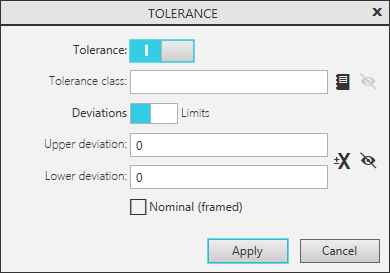
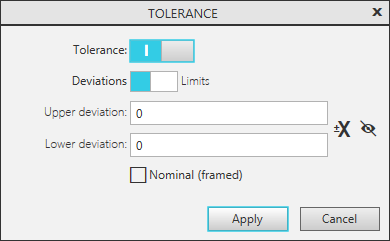
Dialog for assigning a tolerance
a) to a linear value, b) to an angular value
Detailed description of the dialog controls...
For new dimensions and operation parameters:
•state of the switch Tolerance (included/excluded) and default tolerance value are determined by the default tolerances setting (see section Tolerances and ranges – Default tolerances),
•state of the switch Deviations/Limits is determined by the setting of tolerance and range parameters (see section Tolerances and Ranges – Parameters).
Tolerance dialog can be invoked when running the operation or outside of the process (see section Invoke a dialog for assigning a tolerance).
The main actions performed in the Tolerance dialog are represented in the table.
The main actions performed in the dialog Tolerance
Action |
Version |
|
Purpose of the individual tolerance |
Fill in the required fields of the dialog and click Apply button. |
|
Purpose of the general tolerance |
Clear all the fields of the dialog and click Apply button. A general tolerance is assigned if in the general tolerances setup dialog the option Use general tolerances according to ISO 2768-1 (GOST 30893.1) is enabled (see section General tolerances). |
|
Disabling the option of assigning a tolerance (general or individual) |
Set the Tolerance toggle switch into "Disabled" position and click Apply button. |
Note the following special features of the dialog:
•If variables of maximum deviations were created for a sketch dimension or for an operation parameter (see section Variables of maximum deviations) and the cell Expression of the Variable Panel is set for at least one of them, the following control elements are unavailable in the dialog: the field Tolerance Class and the buttons intended for selecting the tolerance class and configuring its display; the switch Deviations/Limits and the fields for limit deviations/limit values of the size.
•In the dialog, you can modifythe display of dimension labels of operations, for example, enable showing limit values of dimension instead of deviations. If the operation size is represented as a detailing element (i.e. the respective derivative dimension), the changes made are transferred to the derivative dimension and will be visible during subsequent editing of the operation. Otherwise, i.e. if there is no derivative dimension, the changed display of dimensional caption is retained only until the end of operation. On subsequent editing operation, its size is displayed according to the setup of tolerance and range of values parameters (see section Tolerances and Ranges – Parameters).
