|
Bend release |
Scroll |
The elements are available in the Bend by Sketch (on building a bend along one edge) and bend.
Bend release means slots in the sheet solid located on the sides of the bend.
Relief cuts may have rectangular or rounded shape. Relief dimensions are defined by the relief depth and width (see Figure).
|
|
a) |
b) |
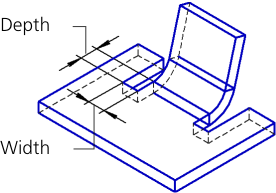
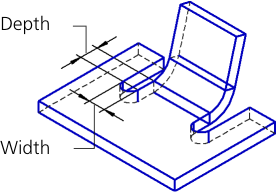
Bend relief: a) rectangular, b) rounded
Relief parameters are set in the Release section.
1.Set the Bend release toggle switch to I (enabled). The controls to configure relief will appear on the Parameters toolbar.
2.Set the relief parameters.
•Select the type of relief by clicking the required button in the Type group:
 Rectangular,
 Rounded.
•Enter values of the relief depth and width in the Depth and Width fields. Only positive or zero values are allowed.
•Set the position of the reliefs relative to the bend using the option Account for bend width. With the option enabled, relief widths are included in the bend width (the actual bend width decreases); with the option disabled – not included (the bend width does not change).
|
|
|
a) |
b) |
c) |
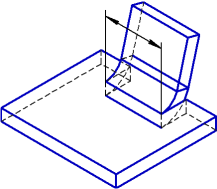
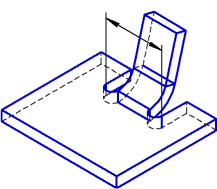
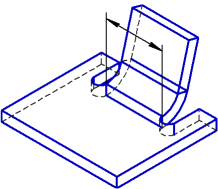
Relief positions
a) width of the bend without reliefs, b) reliefs are included in the bend width,
c) reliefs are not included in the bend width
If the bend angle is not zero, the bend relief rotates (see figure). The rotation angle of the relief is equal to the angle on the bend.
|
|
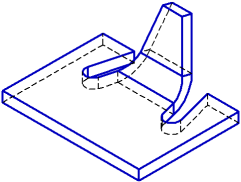
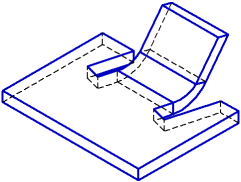
Bend relief with an angle on the bend that is different from zero
The relief depth is plotted along the side face of the unfolded bend, and the relief width – perpendicular to this face.
|
|
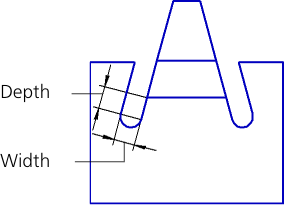
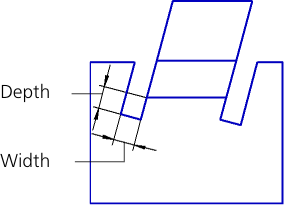
Defining sizes of bend relief with an angle on the bend that is different from zero
