|
Arc Dimension |
Scroll |
Arc dimension defines the length of the circular arc. An arc symbol is automatically displayed above such dimension value.
To build an arc dimension, follow these steps.
1.Invoke the Arc Dimension command  .
.

2.Specify the arc to be dimensioned. In the graphic region, a phantom of dimension will appear.
3.Set direction of extension lines using the Leader lines group of buttons:
 Parallel — extension lines are parallel to the radius reaching the middle of the arc (see Fig. a),
 From the center — extension lines are drawn from the center of the circle (see figure b).
|
If the aperture angle of the arc is over 180°, you can only create dimension with extension lines from center. |

|
|
a) |
b) |
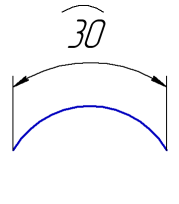
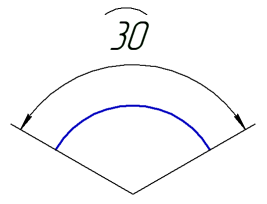
a) with parallel extension lines; b) with extension lines from center
4.Edit the dimension text, if required. To start working with the dimension text, press any alphanumeric key. See section on editing the dimension label...
5.Set the number of decimal places in the dimension text. Details...
6.Set a dimension tolerance. Details...
7.Set up additional dimension parameters, if required: dimension text placement option, arrow display parameters, etc. Details...
8.If you need to join an arc and the text of its dimension with a pointer, enable the Additional parameters in the Advanced Options section. For example, it might be required when setting dimensions for concentric arcs with the same aperture and starting angle.
|
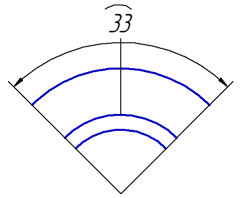
Example of setting an arc dimension with a pointer from text to arc
9.Set the point defining the dimensional line location.
•If you select automatic, fixed or manual placement of the dimension text, the specified point also defines the text position. After this point is specified, dimension creation is automatically completed.
•If you select to place dimension text on the landing, the specified point defines dimensional line location and start of the leader. In this case, you need to specify one more point – a starting point of the landing. After this point is specified, dimension creation is automatically completed.
10.To complete operation of the command, click Finish  .
.
See Also
