|
Base |
Scroll |
To create a designation for the datum surface, use the Base  command.

Step-by-step instructions
1.In the graphic region, specify the object for assigning a designation. The name of selected object is displayed in the Object field on the Parameter Panel. A phantom of the signage will appear in the graphic region. The midpoint of the base of the triangle designating the datum matches the point at which the object was specified.
2.After indication of the object, the position of the designation plane will be determined automatically. By default, as the base plane one of the coordinate planes is used.
You can Change the plane of designation using the elements of the group Location.
3.Select the placement option for the signage: perpendicular to the designated surface or at an arbitrary angle relative to it. To that end, press the required button in the Leadergroup:
 Arbitrary ,
 Perpendicular2.
|
The line connecting designation of the datum and frame starts in the middle of the frame side if the designated object deviates from the vertical or horizontal by no more than 2°. If the slope is greater, then the line starts at the closest frame vertex. |

4.The letter suggested by the system for designation of datum is displayed on the phantom of designation and in the Text field on the Parameter Panel. If necessary, you can change the label and/or its typeface – in the same was as on creation of designation of the datum surface in the graphic document. Details...
5.If necessary, set the name and color of designation using the elements in the Properties sector. More about managing object colors...
6.Specify the position of frame with the label.
After the indication of the sign position, creation of designation of the datum surface ends automatically. In the graphic area, the created designation will appear, and in the Design Tree its icon .
7.To complete operation of the command, click Finish  button.
|
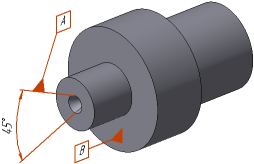
Example of labeling the datum designation
See Also
