|
Recalculation management |
Scroll |
Control of recalculation of dimensions of a model is performed in the made in the Document manager. The following operations are available:
•creation, editing or deletion of user-defined recalculations;
•the choice of recalculation according to which the calculation of model dimensions will be performed (i.e. assigning a specific recalculation as the current).
More details on the creation of user-defined recalculation, its editing, and deletion...
The methods of working with recalculations are described in section Techniques of working with recalculation modes in the Document manager.
To control recalculation of dimensions, the Recalculation control... command is used.

After fetching the command, the Document manager dialog appears on the screen, see the figure below. In the left part of the dialog, in the document Tree, the element Recalculate dimensions element is selected and the list of recalculations is expanded. The list of recalculations contains the names of all the recalculations of model dimensions — system and user-defined (if they have been created). Before the name of a system recalculation, the character "c" in round brackets is displayed. The current recalculation is marked with a "checkmark".
|
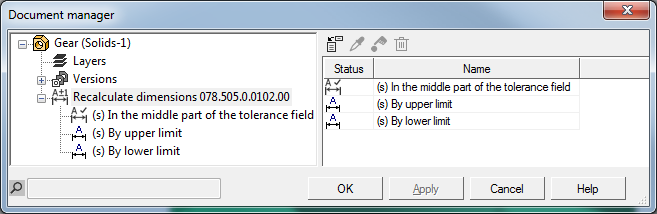
Control of the recalculation mode in the Document manager
The right-hand part of the dialog is intended for work with recalculations. Its contents depend on what action is performed at present – control of recalculations or setup of user-defined recalculation.
•To control recalculations, in the Document Tree select the Recalculate dimensions element. In the right-hand part of the dialog, the following is displayed (see figure above):
•a toolbar containing buttons to fetch commands for control of recalculations,
•a list of recalculations as a two-column table: Status and Name.
•To set up user-defined recalculation, select its name in the Document Tree. In the right-hand part of the dialog, displayed are:
•a toolbar containing the buttons to fetch commands for setting the parameters of recalculation,
•a list of recalculated variables in the form of a four-column table:
•the Name column contains names of variables and/or components,
•the Parameter column contains the names of parameters of operations whose sizes need to be recalculated (for components – it is empty),
•the Method method column is designed for selecting the method of recalculation of variable value; each cell in the column contains a dropdown list of recalculation methods: to the middle of tolerance field, by upper limit, by lower limit, with coefficient (see table Methods of recalculating model dimensions); available for a component in the list are user-defined recalculations if they are created in the component file; recalculation with a coefficient for components is not used,
•the Coefficient column is used to set a coefficient; the coefficient value may vary within 0 to 1 (0<K<1).
|
Parameters of the system recalculation are not displayed in the Document manager dialog. |

Examples of user-defined recalculations are given in the figure.
|
a) |
|
b) |
|
c) |
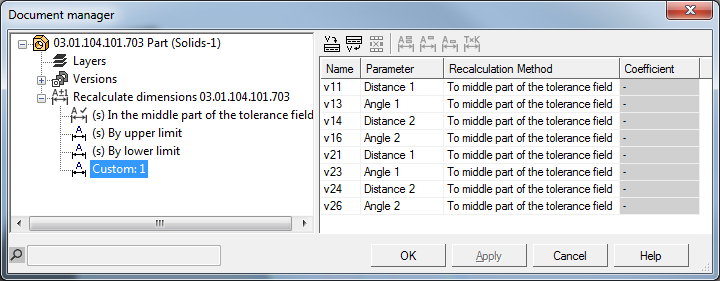
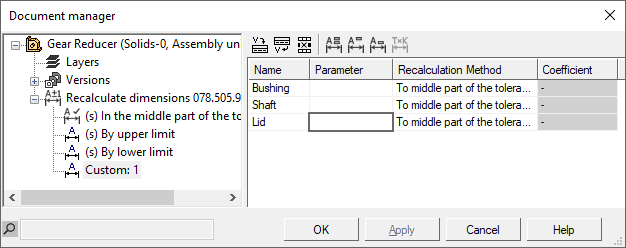
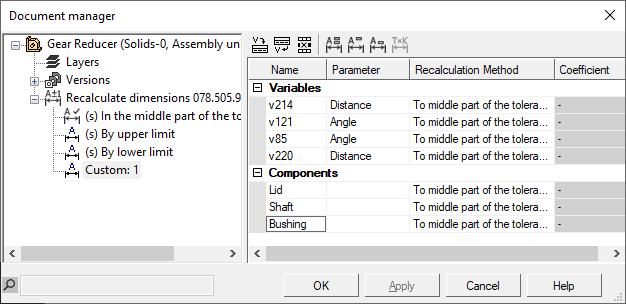
Displaying custom recalculation parameters:
a) the set includes only variables of dimensions of sketches and operations;
b) the set includes only components;
c) the set includes variables of dimensions of sketches and operations, and components;
Creation, editing and deletion of a custom recalculation is described below.
