|
General information about style. Report styles dialog |
Scroll |
The report style defines the appearance of the report. The style settings of a report affect the display of specific properties in columns, the naming of columns, their sequence in the report, the methods by which they are sorted and grouped, the size of cells and the text alignment method used inside them, the splitting of tables into pages, and other parameters.
You may create styles using the following methods.
•You can create or edit a style as part of the style library prior to any report generation (see section Creating and editing a style).
•You can configure the current report style directly during the report creation (see section Report type configuration). A particular style is only available for use until the end of the document managing session. If the configured style is intended for regular use, it should be saved in a library.
Report style libraries are *.lrt files; relatively to documents, they are external. Libraries may be transferred over to other work places. Styles stored in libraries are available for generating reports from various documents.
To use any styles from a library, you need to attach it to the system (see section Attaching report styles).
|
System report styles are included in the delivery kit: By Default and By All Properties. These styles are available for the process of report creation. They may be used as bases for creating more styles, but disabling or deleting them from the system or transferring them to a report style library is not possible. |

Use the Report Styles... command to work with style libraries.  .
.

After calling the command, a dialog Report Styles (see figure) appears on the screen, where you can create, browse, edit styles stored in the library, as well as edit the structure of libraries, copy and move styles from one library to another.
|
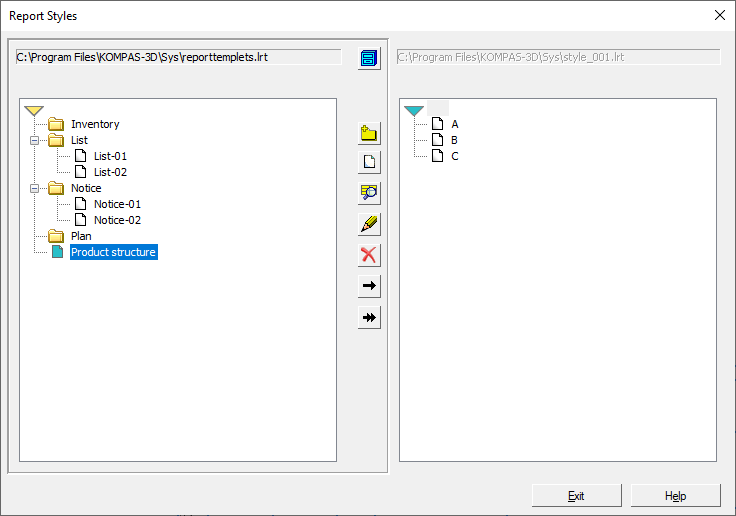
Dialog of working with libraries of report styles
Description of the elements of the dialog for working with report style libraries...
|
All changes made in the dialog will be saved automatically. They can't be undone. |

