|
Midline |
Scroll |
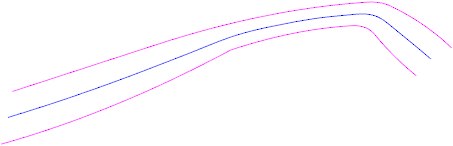
In KOMPAS-3D, you can construct a Midline—a plane curve that represents the locus of points equidistant from two selected curves. The Midline is constructed in the plane selected as the base plane.
The midline is associatively linked to the source curves. When the source curves are modified, the midline changes as well.
|
Midline
The Midline command is used to draw a centerline  .
.

Procedure
1.Select the curves between which the average line will be drawn. Each source curve can consist of a single curve or a chain of curves. The selected objects are highlighted in the graph area, and their names are displayed in the Curve 1 and Curve 2 fields on the Parameters Panel.
To select a source curve, activate the corresponding field—Curve 1 or Curve 2—and specify the desired objects in the order in which they are connected.

2.Select the reference plane in which the midline will be located. Learn more...
After specifying both source curves and the base plane, the centerline phantom appears in the graphics area. It may consist of one or more contours.
If a source curve consists of several segments connected by tangents, this chain is treated as a single object.
In other cases, the segments are treated as separate objects. Each individual object of one source curve is matched with each individual object of the other source curve. The centerline is calculated for all possible pairs of objects; see the figure.
|
|
a) |
b) |
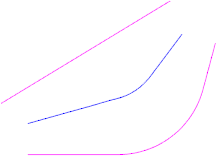
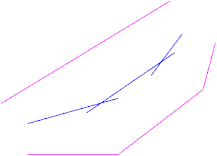
Result of constructing the midline:
a) the segments of the original curve are joined along the tangent, b) not along the tangent
If all the objects that make up the first and second reference curves lie in the plane specified as the base plane, the median line is constructed relative to the reference curves. Otherwise, the selected objects are projected onto the base plane, and the idline is then constructed between the resulting projections.
|
The absence of a phantom is an indication that a midline cannot exist for the selected source objects. |

3.In general, the form of the median line may vary depending on which of the initial curves is used as the base curve. The base curve is defined as the curve (or sequence of curves) on which the algorithm for calculating the median line performs the initial partition. The other initial curve is the reference curve.
To select a base curve, click the appropriate button in the Direction of calucation group:
 From curve 1 — the first initial curve is the base curve,
 From curve 2 — the second initial curve is the base curve.
4.The centerline can be constructed based on the boundaries of the reference curve or by extending sections of that curve. Select the method for calculating the centerline using the "Consider boundaries" option:
•If this option is enabled, the calculation uses the response-to-step curve within its actual boundaries;
•if the option is disabled, extensions of the response curve may be used, either in one direction or in both directions.
1.If necessary, select the desired contours for construction. More details...
5.If necessary, make the midline smoother. To do this, use the Smoothing section in the Parameters Panel. Learn more...
6.You can specify the name, color, and display settings for the centerline. Use the Properties section to do this.
1. To complete the operation, click the Create Object button.
A centerline appears in the graphics area, and an object with an iconand child objects corresponding to the number of individual segments in the curve appears in the Construction Tree.
2.To finish the command, click the Finish button  .
.
See also
