|
Individual tolerances in the table of modifiable variables |
Scroll |
Table of modifiable variables May contain dimension variables for sketches and operation parameters of the copied object. Functions of the Table of modifiable variables allow viewing and modifying individual tolerances of these dimensions and parameters (for tolerances see section Tolerances).
You can display and change individual tolerances in the table in the Manual entry of variable values.
To display tolerances, press the Display Individual Tolerances  button on the toolbar of the dialog. A table column will appear for each variable to display values of tolerances. Tolerance can be displayed as maximum deviations or as a range of values for a dimension (parameter). This depends on the configuration made when Assigning a tolerance.
Tolerance is not displayed in a cell if:
•value and tolerance of instance parameter are equal to value and tolerance of corresponding base instance parameter – in this case cell will be empty,
•general tolerance is assigned to instance parameter value, or the parameter has no tolerance,
•When assigning a tolerance, its display was disabled (Show in label  button was unchecked in the tolerance assignment dialog).
An example of table with enabled display of tolerances is provided on the figure.
|
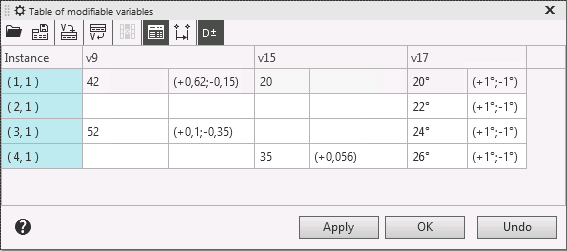
Display of individual tolerances in the table of modifiable variables
You can change tolerances assigned to the dimensions (parameters) of all instances but base instance.
To assign or change a tolerance, perform the following steps.
1.Activate the relevant table cell and call the tolerance assignment dialog using one of the following methods:
•Invoke the Assign tolerance command from the context menu of the table cell with the variable value,
•if the Display individual tolerances button is pressed, double-click in the tolerance cell or call the Assign tolerance command from the context menu.
Tolerance dialog appears. It contains elements for assigning tolerance.
2.Perform required actions to assign tolerance. These actions are similar to ones described in section Assigning a tolerance.
3.Close the dialog by pressing OK button.
See Also
Creating, editing and deleting the table of modifiable variables
