|
Centerline |
Scroll |
To create a centerline running through two set points, use the Centerline through two points  command.

Step-by-step instructions
1.Configure settings of the centerline. You can do this the same way as you do when creating a center mark. There's just one difference: when you work with the centerline, the Parameter Panel contains the Identical juts.
•If the switch is set to position I (on), the protrusions for the end points of the centerline have the same length, which is specified in the Jut field.
•If the toggle switch is set to position 0 (disabled), then the lengths of the protrusions are specified in the fields Jut 1 and Jut 2. If required, you can swap these values using Swap  button to the right of the fields.
For details about Parameters settings...
2.Set the points through which the centerline will run, using one of the following ways:
•indicate the initial and final points of the centerline (for example, crosspoints with the contour of an axisymmetrical part),
•indicate the starting point, then set the length and slope angle of the centerline (the angle between the centerline and the abscissa axis of the current coordinate system) in the respective fields on the Parameter Panel.
In the document, a centerline protruding outside the indicated points will be created.
3.To complete operation of the command, click Finish  .
.
|
To precisely set the position of the points of the centerline, you can use Snaps and geometrical calculator. |

|
|
a) |
b) |
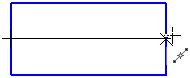
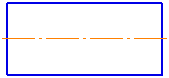
Building a centerline using two points
a) indication of points using a snap, b) result of plotting
|
Note that the execution of the Centerline by two points command results in the centerline object but not a segment with the Axial style. Work with objects of this type does not differ from work with objects of other types. For example, using the Select by properties... Command you can select all centerlines in a document. |
