|
Building a slot |
Scroll |
To build a slot, use the Slot command  .
.

Step-by-step instructions
1.Select the slot design method by clicking the required button in the Method group and establish the parameters (see table).
Design method |
Design rules |
Example |
|
|
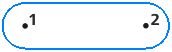
By centers |
a)Specify the center of the first arc of the slot. b)Specify the center of the second arc or the distance between the centers of the arcs and the slope angle of the slot in the Length at centers and Angle fields. |
|
|
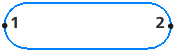
By size |
a)Specify the midpoint of the first arc of the slot. b)Specify the midpoint of the second arc or the length and the slope angle of the slot in the Length to dimensions and Angle fields. |
|
|
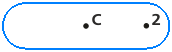
From the midpoint to the centers |
a)Specify the slot center. b)Specify the center of the slot arc or the distance between the centers of the arcs and the slot slope angle in the Length at centers and Angle fields. |
|
|
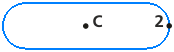
From the midpoint along the dimensions |
a)Specify the slot center. b)Specify the midpoint of the slot arc or the length and slope angle of the slot in the Length to dimensions and Angle fields. |
|




2.Set the slot width in the Width field on the Parameter panel.
The slot will be automatically created.
|
For accurate positioning of the cursor and to establish parameters during building, you can use snaps and the geometrical calculator. |

3.To complete operation of the command, click Finish  .
.
