|
Building an arc slot |
Scroll |
The arc slot is constructed using the Arc slot command  .
.

The following methods are available for building an arc slot:
The required option is selected in the group of buttons Method on the Parameter panel. Select a method and establish the required parameters.
In the process of building, you can switch between methods. The values of parameters established for each method are stored until the command is completed.

To build an arc slot by center and two points, do the following actions.
1.Specify the center of the arc axis of the slot.
2.Specify the center of the first side arc of the slot in one of the following ways:
•Specify the center with the mouse,
•Enter the starting angle and the radius of the arc axis slot into the fields Starting angle and Radius.
The arc slot can be built either clockwise or counterclockwise. The direction of building can be changed by a cursor, passing it through the center of the first side arc of the slot in the opposite direction to the current.
3.Specify the center of the second side arc of the slot in one of the following ways:
•Specify the center with the mouse,
•Enter the ending angle and the included angle of the arc axis slot in the fields End angle and Aperture angle.
The arc slot can be located on either one or the other side of the straight-line passing through the centers of its lateral arcs. To change the current slot position, click Position of the slot  in the group Position. The button is available after specifying the first side arc of the slot.
4.Set the width of the slot in the Width field on the Parameter panel.
An arc slot will be automatically created.
5.To complete operation of the command, click Finish  .
.
|
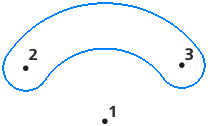
Building an arc slot by center and two points
Additional features when building...

To build an arc slot by three points, do the following actions.
1.Specify the center of the first side arc of the slot.
2.Specify the center of the second side arc of the slot.
3.Specify the point through which the arc axis of the slot should pass, using one of the methods:
•Specify the point with the mouse,
•Enter values of the radius and angle of the slot arc axis spread into the fields Radius and Aperture angle on the Parameter panel, then specify the position of the slot by clicking with the mouse on one side or the other relative to the line connecting the centers of its side arcs.
|
When manually entering the value of the slot arc axis radius in the Radius field, note the following peculiarity. If the radius value is entered after specifying the centers of both side arcs of the slot, then by default the slot is built with the minimum possible aperture angle for the given radius value. If it is necessary to build an arc slot with an included angle, complementing the default angle to a full circle at a given radius value, enter the expression in the Aperture angle field: 360 - A, where A is the minimum(i.e., current) aperture angle. |

4.Set the width of the slot in the Width field.
An arc slot will be automatically created.
5.To complete operation of the command, click Finish .
|
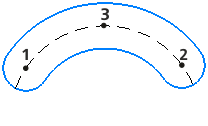
Construction of an arc slot by three points
Additional features when building...
Tips
For accurate positioning of the cursor and setting the parameters in the process of building an arc slot, you can use snaps and geometrical calculator.
