|
Selection of objects to copy |
Scroll |
In this section:
Copying sketches of the «environment» when editing component «in place»
•You can select objects from the current model both before and after the copy process starts. Objects from another model can only be selected once the process has started.
•To select an object (for example, a sketch or a body) in its entirety, specify it in the Design Tree. If you want to select not the entire object, but some of its elements (for example, a curve in a sketch, a body face), specify this element in the graphic area.
|
You can select objects with a frame and special frame selection commands. |

•When specifying curves/edges and faces in the graphical area, you can select a single object or a group of objects that meet a certain condition. The elements of the Quick Access Toolbar are used to set the condition.

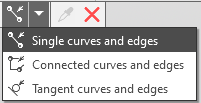
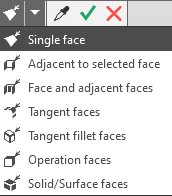
•The use of curves with subordinate curve objects (projection curve, intersection curve, etc.) has features.
•To select a body/surface, it is enough to specify in the Construction Tree the operation that created any of the elements of this body/surface.
•When specifying an operation, it is not the element created by this operation that is selected, but the body or surface to which it belongs. For example, if you specify a rounding operation, the entire body/surface is added to the list of copied objects, not the rounding operation itself or the face that was not rounded..
•To select all bodies and surfaces in the model simultaneously, use the commands:
•Bodies visible in projections on the principal planes — highlights bodies and surfaces that are not occluded by other objects in all standard orientations.
•Bodies invisible in projections on the principal planes — highlights bodies and surfaces that are completely occluded by other objects in all standard orientations.
In the current document, the commands are called from the menu Select — By visibillity; in the window Model-source —from the button menu Select...  on the toolbar.
Bodies/surfaces of all nesting levels are selected in assembly models.
|
You can only select objects in components if they are Full load (see section Incomplete assembly load for types of loading). |

To select objects of certain types in the graphic area and in the window Model-source it is convenient to use filters.
You can simultaneously select all model/component objects of certain types (except primitives). To do this, enable filters for the desired object types (e.g. Bodies, Surfaces, Sketches, etc.) and specify them in the Design Tree:
•
•root element — to select all data model objects of the following types,
•component — to select all the component objects of these types.
The selection is available both in the current document and in the Source Model window.
If an assembly model is specified in the Build Tree, then objects of all levels of nesting are selected, i.e. those built in the assembly itself, in components inserted directly into the assembly, components of subassemblies, and further to the full depth.
If some objects of the specified types were selected earlier (their names are contained in the Objects field), then when specifying the same model/component, all other objects of these types will be selected, and the previously selected objects will be excluded from the list of selected ones.
Copying sketches of the «environment» when editing a component «in place»
If a copy of geometric objects is created when editing component «in place», then objects of the «environment» can be specified for copying, in particular sketches built in the assembly and its other components.
It is possible to copy both individual sketch objects — lines with the Main style, segments with the Axial style, centerlines and points, and the sketch as a whole. Individual objects are indicated in the graphic area, and the whole sketch is indicated in the Design Tree.
|
The entire sketch can be selected in the graphic area using the appropriate filter or secant frame. |
Individual sketch objects of the «environment» they are copied in the same way as the objects of the sketches of the current model or the selected file.
Copying an entire sketch of the «environment» has special features: the resulting copy is the sketch without history and contains only a three-dimensional representation of lines with the Main style (taking into account the areas formed by closed contours), segments with the Centerline style, centerlines and points. Information about the rest of the sketch objects is not transmitted during copying.
The resulting copy of the sketch or its objects can be used to build the geometry.
If a copy is destroyed, all its objects become independent, including sketches without a history. However, such sketches cannot be edited, because a sketch without a history does not contain information about the construction of the objects included in it.
The position of the sketch without the history can be changed. To do this, the process of Placing sketch is used.
