|
Named groups |
Scroll |
While working with a drawing, there often comes up the need to integrate separate elements of an image for some time, which are logically interconnected, for the convenience of their search and editing. For example, if the design of contained with a lid is developed, it will be convenient to select and move the image of the lid and all the structural elements located on it simultaneously, in case the height of container changes.
When working in KOMPAS-3D, it is possible to combine an arbitrary number of objects into groups. The essential fact is that inclusion of an object into a group does not impose any restrictions upon its independence. An object can still be edited separately, up to its full deletion.
Each object of a graphic document can be included into several groups created in this document. A group may integrate objects located in various layers (see section Layers) and in different forms (see section Views) drawing.
For the convenience of work, you can set a name for each created group.
A group can be destroyed at any time, which will not affect the objects which were part thereof.
The following edit commands can be applied to a group:
•Offset (see Section Shift,
•Rotation (see section Rotation,
•Scaling (see section Scaling,
•Symmetry (see section Mirroring,
•Copy (see section Commands to copy objects).
|
While executing the Symmetry and Copy commands, no new groups are generated in the ocument. Created are only copies of the objects which are part of the source group. |

Groups can also be copied and transferred using the clipboard.
To execute any of the above-mentioned actions with a group, it needs to be selected. For that purpose, the Select – By propertiescommand is used. After its invocation, a dialog appears on the screen, in the left-hand part of which in the Other group enable the Groupsoption, and in the right-hand part – the options near the names of groups which should be selected. Then, in the dialog press the Select or Applybutton. More about selecting objects by properties...
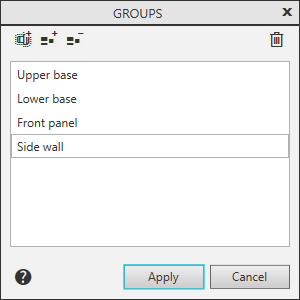
Managing object groups is performed in the dialog (see Figure), invoked by running the Drafting — Groups... command. The command is available if there are selected objects or earlier created groups in the document.
|
The Groups... Command is available also in the context menu of selected objects. |

|