|
General information about the solids |
Scroll |
A new solid in the model can be created in the following ways:
•build a solid using the objects available in the model using the build commands:
•extrusion — the body is formed by moving a section along a straight–line trajectory for a specified distance; For more detail: on extrusion...
•revolution — the body is formed by rotating the section around the axis at a given angle, More details on rotation...
• by path — the body is formed by movement of the section along an arbitrary path, For more details on building an element by path...
•by sections — solid is formed by connecting several sections, More details on building an element by sections...
• thickening — the solid is formed by adding a layer of material to the specified surface, More details on thickening...
•surface stitching — the solid is formed, bounded by the specified surfaces, More details about surface stitching...
•sheet solid — a special type of solid is formed — a sheet solid, More about sheet solids...
•build a solid in the form of a parallelepiped, cylinder, or sphere without using existing objects in the model, More details about elementary solids...
•insert the solid from the file of another model in the form of a blank part, More about the blank part...
After creating a new solid, "gluing" to it or "cutting out" additional volumes from it, i.e. add or remove solid material.
|
|
|
|
a) |
b) |
c) |
d) |
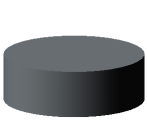
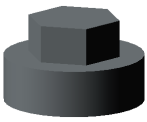
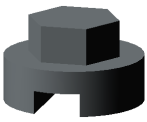
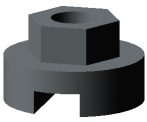
a) new solid – a cylinder; b) "gluing" the prism;
c) "cutting out" the prism; d) "cutting out" the cylinder
Examples of material removal can include various holes, grooves, and channels, while examples of addition can include bosses, protrusions, and ribs.
|
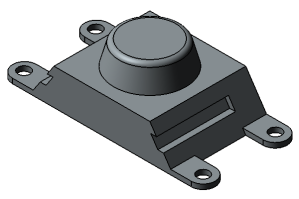
Bosses and clamps are glued to the solid, slots and holes are cut from it
A model may contain several solids. With bodies, you can perform Boolean operations.
Using the existing bodies in the model, you can create new ones using array building commands.
