|
Arc Dimension |
Scroll |
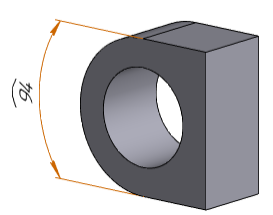
To set the circular arc length in the model, use the Arc dimension of the circular arc  command.

Step-by-step instructions
1.Select an object for dimension. Its name will be displayed in the Object field on the Parameters toolbar. A phantom of dimension with an arc symbol will appear in the graphic region.
Dimension is placed in the arc plane.
2.Set direction of extension lines using the Leader lines group of buttons:
 Parallel — extension lines are parallel to the radius reaching the middle of the arc,
 From the center — extension lines are drawn from the center of the circle.
|
If the aperture angle of the arc is over 180°, you can only create dimension with extension lines from center. |

3.Set up dimension text options. To that end, click in the Text field on the Parameter Panel, or press any of the alphanumeric keys on the keyboard. This will start the Add Text subprocess, and the graphic region will display the label entry table and an additional Parameter Panel. Setup is performed in the same way as it is on creation of a dimension in the graphic document. Details...
4.Set the number of decimal places in the dimension text. That is done the same way as during creation of dimension in the graphic document. Details...
5.Set a dimension tolerance. The order of assigning a tolerance is the same as on creation of a dimension in the graphic document. Details...
6.Specify the placement option for the dimension text using the Text Location group of buttons. Text location is configured the same way as during creation of a dimension in the graphic document. Details...
7.Set up the Drawing dimension arrows.
8.Specify the option of arrangement for the dimension text relative to the dimensional line by pressing the required button in the Text Location group:
 Parallel, above line,
 Parallel, in line break,
 Horizontally, in the line break.
9.If you need to join an object and the text of its dimension with a pointer, enable the Additional Parameters option Pointer from text to arc in the section.
10.If necessary, set the name and color of dimension using the elements of the Properties sector. More details about managing object colors...
11.Set position of the dimensional line. After that, creation of the dimension completes automatically.
The specified position of the dimensional line also determines the position of dimension text (if the automatic, fixed or manual placement of a label is selected) or the start of the landing (if placement of label on the landing is selected).
12.To complete operation of the command, click Finish  button.
|
Arc Dimension
See Also
General information. Controlling and informational dimensions in the model
