|
Model executions and versions tree |
Scroll |
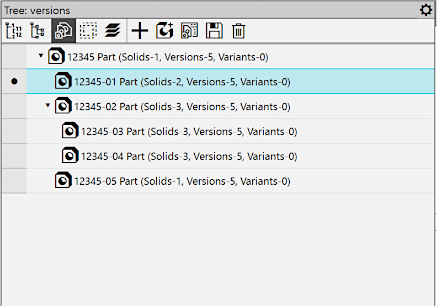
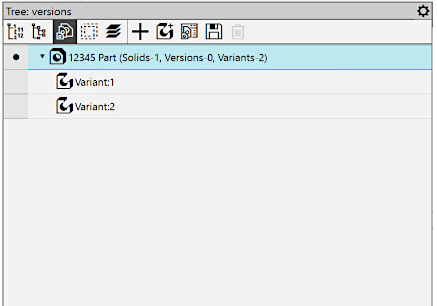
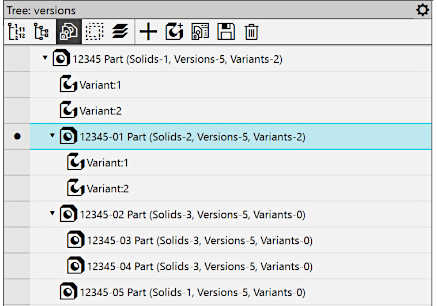
Versions and Options The models are displayed on the Tree Panel with Versions  button pressed. In this case, the title of the toolbar displays the name Tree: versions. Depending on the presence of executions and variants in the model file, the Tree can contain only executions (Figure 1), only variants (Figure 2), or both executions and variants simultaneously (Figure 3). In the top part of the Tree toolbar, there are buttons that allow you to perform various actions with executions and variants.
|
|
|
Fig. 1 The model contains |
Fig. 2 The model contains |
Fig. 3 The model contains |
Model executions and versions tree
The main model version takes the first position in the Tree, and the other versions (dependent and independent), as well as model variants, are in the next positions. All independent versions are located on the first level of the tree hierarchy. Dependent versions and variants are subordinated to the version which is initial for them.
If required, you can hide the dependent versions and variants by clicking the mouse on the triangle next to the icon of their original version. Clicking the triangle again displays the hidden objects.
The current execution/option is marked with the icon  (see the figures above). Methods for selecting the current execution/version are described in section Selecting the current version/option. The Design Tree of the current version/variant can be viewed without switching buttons on the Model tree toolbar. It is displayed below the Versions and Variants tree and repeats the Model Design Tree in the view. Construction History.
Every object in the Versions and Variants tree has its name and icon.
Execution Name
The version name consists of its designation and name. The designation is formed when the version creating. The default name is the name of the main version. Both the designation and the name of the version can be changed when editing properties (see section Editing version properties). Renaming is also possible directly in the Execution and Variation Tree using the Rename command from the context menu or the <F2> key.
How the designation and the name are displayed in version names corresponds to the default setting configured for the model in the dialog. Name format in Document Tree. If required, you can use this dialog to include or exclude any object property values into or from the object name as well as add prefixes before property values in the name.
For example, in the figure below, there is a Feature Tree of a part, for which, in addition to the properties Designation and Name, the name includes a property created from a variable that defines the length of the part, with the prefix "Length = " assigned to this property. For more details on forming object names, see section Names and icons of objects in the Design Tree.
|
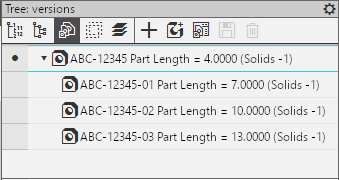
Displaying property values in version name
|
The set/edited designations and names of model versions are saved in its file regardless of whether they are displayed in the Tree. |

In addition to the designation, name, and specified properties set during configuration, the execution name may also display information about the number of objects of various types contained within it (this information is provided in parentheses after the designation, name, and property values). The set of objects, the quantity of which is indicated in the title, is identical for all versions of the model, including the main version. He is set up in the dialog Information about the model in the Tree root element. In the figure above, a model with versions is shown, for which the display is configured to show only the number of solids in the name.
Variant Name
The model variant name is specified by the user when variant creation (by default it consists of the word "Variant" and a serial number). In Figures 2 and 3 (see above), the display of names of configurations in the Configuration Tree and configurations of the model is shown.
In the Model Design Tree, the variant name is shown in the root element row of the Tree. Additionally, this row displays: the name of the version to which the variant belongs, and information about the quantity of objects of different types contained in the variant (this information is provided in parentheses, and its composition can be configured, see section). Root control). The name of the variant is placed after the version name and has the form <variant name> (see the Figure).
|
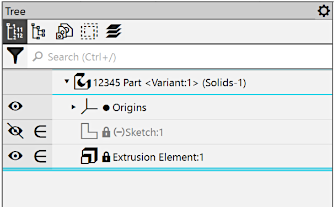
Displaying variant name in the root element row of the model Design Tree
The text of the variant name corresponds to the value of the Geometric Representation Variant property. You can change it by editing the value of this property. You can also rename a variant in the Execution Tree and Variants using the Rename command from the context menu or the <F2> key.
|
The setup performed in the dialog Name format in Document Tree is not applied to the names of model variants. |
