|
Round grid of centers |
Scroll |
The circular grid of centers allows to create axial lines for a group of objects whose centers are located on the same circle. Objects are circles and circular arcs.
The grid includes circular and radial centerlines running passing through the centers of the indicated objects.
To create a circular grid of centers, the Round grid of centers  command is used.

Step-by-step instructions
1.Set the objects (circles, arcs of circles) to build a grid. You can do this using one of the following methods.
•Indicate three objects through the centers of which a circular centerline should run through. The object is highlighted when the mouse pointer is aimed at it, and the cursor takes the shape of a square "trap".
If the snaps hinder indication of objects, you can select objects while holding the <Alt> key (temporary disabling all the snaps) or disabling the snaps which hinder indication of objects.
•Set the center of grid and indicate the object through which center a circular centerline will run. To precisely set the center of the grid, you can use Snaps and geometrical calculator.
After indication of the objects, a phantom of circular grid will appear in the graphic region.
|
Objects can be selected prior to invoking a command. In this case, after its invocation a phantom of circular grid of the centers will appear in the graphic region. |

By default, all the circles and arcs of circles whose centers lie on the circular centerline are determined automatically. When the Auto  button is pressed, located to the right of the Objects field.
Objects are highlighted in the graphic area, and their names are displayed in the field Objects. If on the circular centerline the center of concentric objects is located, then as the datum determined is the one which has the largest diameter.
Datum objects can be indicated manually. To do so, click Auto button. Names of objects determined automatically will be deleted from the Objects field. Indicate the required objects. The curve whose indication is possible is highlighted when captured inside the "cursor trap".
2.Using the With center mark option, indicate whether rendering of designation of the center of circular centerline is required. With the option enabled, on the phantom of the grid there will appear axes rendered in the directions of axes of the coordinate system of the view.
If in the current view there are circles, concentric circular centerlines and having a greater diameter, then the axes of center marks are extended to a circle of the largest diameter and jut outside it to a set distance.
3.Using the Close Centerline option, select the option of building a circular centerline – closed or open. With the option enabled, the circle is built, when disabled – the circular arc running through the centers of the indicated objects are built.
4.Configure rendering of centerlines using elements in the Parameters sector. Details...
5.To complete creation of a circular grid of centers, press the Create an object  .
.
6.To complete operation of the command, click Finish  .
.
|
|
a) |
b) |
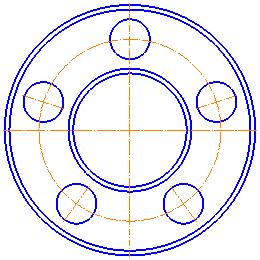
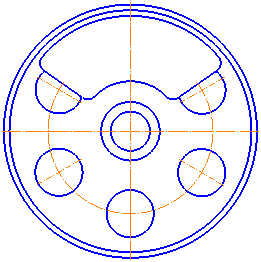
Examples of building a round grid of centers: a) closed, b) open
Notes on creating a center grid in parametric mode
See Also
