|
Intersection of model objects with sketch plane |
Scroll |
In a sketch, you can create curves and/or points that represent the intersections of selected objects in the model with the sketch plane. To create intersections use the Intersection objects command  .
.

----
Step-by-step instructions
1.Specify the model object(s) for intersection with the current sketch plane in the graphic area or in the Design tree.
The object name is displayed in the Objects field on the Parameters panel.
•If the intersection is found, its phantom is displayed in the graphics area in the sketch plane. It may be points, curves, straight lines — depending on the specified model object. More details on the intersection of a sketch plane with objects of different types...
•If an intersection is not found or found not for all specified objects, a relevant informational message will appear on the screen.
The parametric constraint — Projection link  is applied to the intersection object automatically.
If an open intersection curve is obtained as a result of the intersection, then the following constraints also apply to it Projection of the end vertex  . Parametric constraints of intersection curves are similar to the constraints of curves formed when projecting model objects into the sketch, see section Parametrical constraints for projection in sketch.
2.If required, create an intersection with the extension of the specified object. To do this, enable the option Continue until intersection. The option allows to build an intersection with the extension of a linear object, a circular arc, and an ellipse arc.
3.It's available to change the drawing style of lines and points formed at intersections in the fields Line style and Point style on the Parameter panel.
4.To create an intersection, click Create object button  .
.
If the object intersects the sketch plane at a point, an intersection point object is created in the sketch, and if it intersects along a line, then a intersection curve or auxiliary line is created. The properties of the intersection curve are the same to the properties of the curve obtained as a result of projecting model objects into the sketch. Just like the projection curve, the intersection curve can be trimmed, extended, etc., see section Notes on working with the projection curve.
|
•Intersection with an object tangent the sketch plane is created in the case of tangency to a line and is not created in the case of tangency to a point. •Intersection with an object fully belonging to the sketch plane is not created. |

Intersection of the sketch plane with objects of different types
Depending on the intersection of the sketch plane with the model objects, different geometric objects are created, see table.
Results of intersecting the sketch plane with model objects
Model objects |
Result of intersection |
|
Face of a solid or a surface |
Set of curves |
|
An edge of a solid or surface, 3D curve, sketch curve. |
Set of points |
|
Coordinate axis or auxiliary axis |
Point |
|
Coordinate or auxiliary plane |
Straight line |
|
Solid, surface |
Set of curves |
|
Sketch |
Set of points |
In the case when the object is a sketch or a multi-segment curve (for example, contour or broken line), take into account the following special properties.
For the intersection with the sketch plane, you can specify the entire object, specifying it in the tree, as well as a part of an object (a separate line in a sketch or one of the segments of a curve), indicating it in the graphic area. Depending on how the object is used, the result of the sketch rebuild after changing the plane position will vary:
•If a part of the object was used, then the new point position is determined as the intersection with this same part or — in the case of a segment/arc — with its continuation, see figure a. If there is no intersection, the sketch containing points is marked as wrong.
•If an object is used in its entirety, it is perceived as a chain of curves ( there may be several in the case of a sketch chains). Therefore, the new position of the point is determined as the intersection with the same chain, see figure b. As a result, the point can move to another link in the chain. Continuations of links are not created. If there is no intersection, the sketch containing points is marked as wrong.
|
|
a) |
b) |
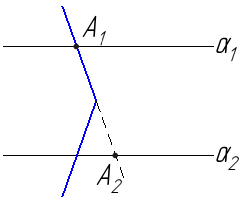
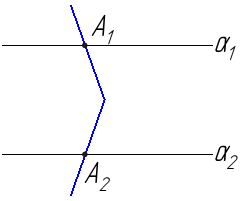
Starting (A1) and new (A2) positions of the sketch plane intersection point
with a contour consisting of two segments, when shifting the plane down (its positions are denoted as α1 and α2):
a) if one of the segments constituting the contour is selected for intersection,
b) if the entire contour is selected for intersection
In a similar way (but without object continuation), the result of intersection is determined in cases when a solid/surface or individual faces of the solid/surface are specified:
•When a solid/surface is selected in the entirety — by specifying the solid/surface itself if the Tree has a view of the structure, or any of the constituent solid/surface operations, if the Tree has a view of construction history, — then the intersection is located immediately with all the faces forming the solid/surface. In the future, if during the changing of the solid/surface it develops new faces intersecting with the sketch plane, the intersection lines will change accordingly. If the edges intersecting with the sketch plane disappear, and if the solid/surface ceases to intersect with the sketch plane, it is marked as wrong.
•When separate faces of a solid/surface are specified in the graphic area, the intersection is found for each face. Furthermore, when changing the shape or position of the faces, the lines of their intersection with the sketch plane will also change. If at least one of the specified faces disappears as a result of solid/surface changing or stop to intersect with the sketch plane, then the sketch is marked as erroneous.
|
Operations that modify a solid affect a sketch if they are located higher in the model hierarchy than that sketch. Otherwise, the sketch does not change. |
See Also
