|
Sketch layer tree |
Scroll |
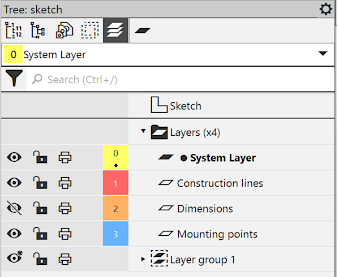
When working with a sketch, you can enable the display of the Sketch layer tree. To do this, choose the Layers  button in the toolbar of the Model tree.
Drawing Layer tree is similar to Fragment tree (they have different toolbars) and contains rows with names of layers and groups of sketch layers. Actions with layers in the Sketch layer tree are similar to actions when working with layers in a graphic document and are described in detail in section Layers. In the Sketch layers tree, the following actions are available:
•creation and deletion of layers,
•establishing the layer parameters,
|
|
When you exit from the sketch mode, on the Document tree toolbar Model layer tree is displayed. |

