|
Arc centerline by two concentric objects |
Scroll |
Using the Auto Centerline command, you can construct a center line by two concentric objects — circles and/or circular arcs. This command creates an arc centerline located between the selected objects at an equal distance from one another.
To build an arc centerline, do the following.
1.Run the Auto Centerline  command.

After invoking the command, the cursor will take the shape of a square "trap".
|
The size of the cursor’s trap can be changed in the Cursor Settings dialog. |

2.Set parameters of the arc centerline using elements of the Parameters. The setup is done the same was as the setup of rendering the designation of the center. Details...
3.Select the design method of the arc centerline by pressing the required button in the Tracing mode group:
 For objects – the boundaries of the arc centerline are automatically determined relative to the specified objects.
 With the indication of the borders — the borders of the arc centerline are set by the user.
4.Select objects in the graphic area to build the arc centerline.
•If the method By Objects is selected, specify the necessary arcs or circles in any sequence. After indication of objects, creation of the arc centerline ends automatically.
|
|
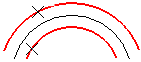
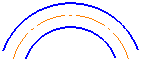
Building an arc centerline using the By objects
•If the method With specifying borders is chosen, specify the required objects, and then the starting and ending points of the arc centerline. If points are indicated outside the phantom of the arc centerline, then its borders are projections of the indicated points onto this line.
To set the borders of the arc centerline, you can indicate the existing curves (figures a, b). Points of intersection with the selected curves will be the borders of the arc centerline.
|
If the curve specified as the border does not Intersect with the arc centerline, the point of its intersection with the extension of the specified curve is used as the starting (ending) point. |

After you set the borders, creation of the arc centerline ends automatically (fig. c).
|
|
|
a) |
b) |
c) |
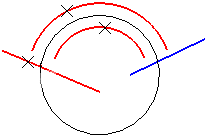
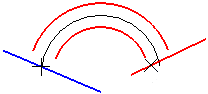
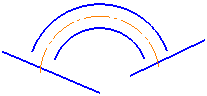
Building an arc centerline using the With specifying borders
|
You can use Snaps. |
5.To complete operation of the command, click the Finish button  .
.
|
As you build an auto centerline between two arcs, the sector areas based on these objects must intersect or have a common border. Otherwise, the second arc is not highlighted when you specify objects. |

|
If you build an auto centerline between two circles, it is advisable to use the construction method By Objects. The circle-shaped centerline is built immediately after you specify the objects. The method with boundary specification provides for the construction of a centerline in the form of an arc by specifying the start and end points. |
See Also
