|
Center mark |
Scroll |
Using the Auto Centerline command, you can create:
•Center marks for several objects.
Objects for labeling a designation of center are circles, ellipses, arcs of circles, and arcs of ellipses.
The command creates a center mark in the form of two axes.
|
Note the following specialties of building the designation of center using the Auto Centerline command. •As the object for building a designation of center, it is impossible to select a regular polygon or a rectangle. •It is impossible to change the type of designation of the center. The specified actions are available in the Center mark. |

Center mark of axisymmetrical object
To build a designation of the center of an axisymmetric object, do the following actions.
1.Run the Autosave  command.

After invoking the command, the cursor will take the shape of a square "trap".
|
The size of the cursor’s trap can be changed in the dialog for setting up the cursor. |

2.Configure the rendering of the centerline using the elements in the Parameters sector. The setup is done the same was as the setup of rendering the designation of the center. Details...
3.In the graphic region, indicate a circle, an ellipse, an arc of a circle, or an arc of an ellipse.
4.If a circle or an arc of a circle is indicated, a phantom of the center mark will appear in the graphic area. On cursor movement, the phantom’s angle of rotation around the center of circle or an arc will change. Fix the designation by a mouse click.
You can use Snaps.
If an ellipse or an elliptical arc is indicated, then the center mark is fixed automatically. The rotation angle of designation cannot be changed since the centerlines coincide with the axes of ellipse.
During creation of designation of the center, the method selected in the Tracing mode group of buttons is ignored.
5.To complete operation of the command, clickFinish  .
.
|
|
|
|
a) |
b) |
c) |
d) |
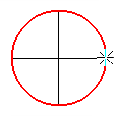


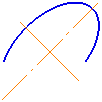
Building a designation of the center of axisymmetric objects
using the Auto Centerline command
Center marks for several objects
To create separate designations of the center for several objects, do the following actions.
1.Select the objects.
You can also select one view in full (not necessarily current). More details on type highlighting...
2.Run the Autosave command.
If the selected objects include circles, ellipses, circular arcs, elliptical arcs, then, after the command is invoked, phantoms of the center marks will appear in the graphic area. Slope angles of designations are determined automatically and can’t be changed.
If among the selected objects there are those not belonging to the current view, not circles, ellipses nor arcs, as well as already having designations of the center, they will be left without change.
3.Configure rendering of centerlines using elements on the Parameter Panel. The setup is done the same was as the setup of rendering the designation of the center. Details...
4.To complete positioning center marks, click Create object  button.
5.To complete operation of the command, click the Finish .
See Also
Centerline parallel/perpendicular to segment
Bisector of angle formed by two segments
