|
Centerline parallel/perpendicular to segment |
Scroll |
To build a centerline parallel or perpendicular to a specified rectilinear object, do the following actions.
1.Run the Autosave  command.

After invoking the command, the cursor will take the shape of a square "trap".
|
The size of the cursor’s trap can be changed in the in the Cursor Settings dialog. |

2.Set parameters of the centerline using elements of the Parameters sector. The setup is done the same was as the setup of rendering the designation of the center. More details.....
3.Select design method of a centerline by pressing the required button in the Tracing mode group:
 By objects — constructing a centerline passing through the specified point parallel to the selected segment; the boundaries of the axis are determined automatically.
 With the specification of boundaries – construction of a centerline parallel or perpendicular to the selected segment; the boundaries of the axis are set manually.
4.Indicate a segment and set the position of the centerline.
•If the By Objects method is selected, indicate the segment and point (in any sequence). A centerline will be built on a straight line parallel to the specified segment and containing the indicated point, symmetrically relative to the projection of the middle of object onto this straight line. The length of the centerline is calculated as a sum of length of segment and two juts.
After indication of the segment and point, creation of the centerline ends automatically.
|
|
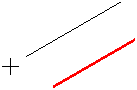
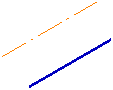
Building a centerline relative to a segment using the By Objects method
•If the With specifying borders method was selected, indicate the segment, then the first and second points of the centerline. Depending on the direction of the cursor movement, on indication of the second point, the centerline will be parallel or perpendicular to the selected segment (figures a, b). If the second point of the centerline is indicated outside the phantom, then the border of the centerline is the projection of the specified point onto this line.
To set the the second point, you can indicate the existing curve. The final point of the centerline will be the point of its intersection with the selected curve (fig. c).
|
If the curve specified as the border does not Intersect with the centerline, the point of its intersection with the extension of the specified curve is used as the starting (ending) point. |

After indication of objects and setting the borders, building the centerline ends automatically.
|
|
|
a) |
b) |
c) |
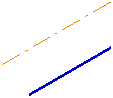
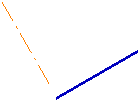
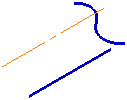
Examples of building a centerline relative to a segment
using method With specifying borders
|
To precisely set the position of the centerline, you can use Snaps. |
5.To complete operation of the command, click the Finish  .
.
See Also
Bisector of angle formed by two segments
